Author: vitaliitymashkov

  • How to Test AI Chatbot Automation the Right Way 

    How to Test AI Chatbot Automation the Right Way 

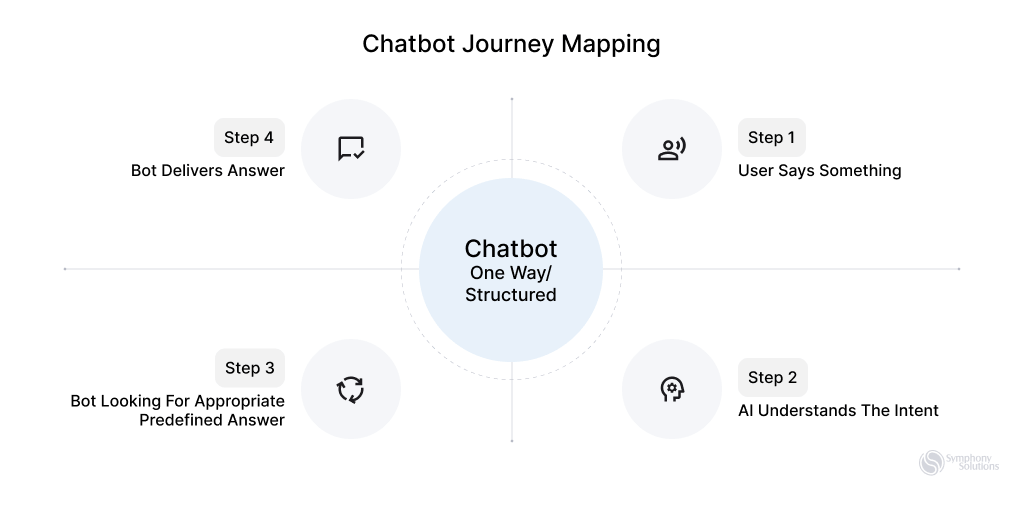
    Chatbots, a part of the digital landscape since ELIZA‘s introduction in 1966, experienced a significant surge in popularity with the advent of OpenAI’s ChatGPT. This technology is reshaping business-customer interactions and will be the primary customer service channel in about 25% of businesses by 2027. This shift could lead to a reduction in support costs by as much as 30%. 
    Tools-For-Testing-Chatbot-Automation

    However, as organizations increasingly adopt chatbots to enhance customer interactions, the need for robust testing methods cannot be overemphasized. Chatbot testing is a pivotal step in the development lifecycle, ensuring seamless functionality and reliability of these automated conversational agents.  

    In this article, we’ll discuss how to test your AI chatbot, shedding light on essential tools and checklists for Testing Chatbot Automation. 

    Continue reading. 

    What Is Chatbot Testing? 

    Chatbot testing is the process of evaluating and verifying a chatbot’s functionality, performance, and reliability. It systematically evaluates the chatbot’s performance to identify and address potential issues before deployment. The goal is to ensure the chatbot can understand user input, provide accurate responses, and seamlessly integrate with other systems, delivering a smooth and user-friendly experience. 

    There are two primary types of chatbots: Rule-Based (Scripted) and AI-Powered (Machine Learning) chatbots, each requiring different testing approaches due to their unique technological underpinnings. 

    Ways to Test Rule-Based Chatbots: These operate on fixed rules and don’t learn from interactions. Testing ensures these rules are correctly implemented and the chatbot responds consistently to set scenarios. 

    How to Test a Chatbot Powered by AI: These AI chatbots improve through user interactions. Testing assesses their learning algorithms and adaptability, ensuring they accurately refine responses and adapt to evolving user behaviors. 

    The Importance of Chatbot Testing 

    Thorough testing is essential for chatbots to provide reliable, and secure experiences, proving crucial in modern digital interactions. This was evident with the launch of Microsoft’s Bing AI in February 2023, where, despite advanced technology, early adopters encountered issues like odd advice and inaccuracies. These challenges highlight why chatbot testing is important.  

    Additional reasons for Chatbot testing include: 

    Accuracy and Relevance: Untested chatbots may struggle to understand user input, leading to irrelevant or incorrect responses. This not only affects communication but can also harm a brand’s reputation. 

    Brand Reputation: Providing inaccurate or offensive information can significantly damage a brand’s image, affecting customer trust and loyalty. 

    Security Risks: Without proper testing, chatbots may pose security threats. For instance, despite ChatGPT’s reliability, 71% of IT professionals are concerned about its potential misuse for hacking and phishing. 

    Integration and Compatibility: Untested chatbots can face challenges when integrated with other systems, hindering smooth operations and user experience. 

    Legal and Regulatory Compliance: Unchecked chatbots risk violating laws and regulations, exposing organizations to compliance issues and potential legal consequences. 

    Adaptability and Evolution: Proper testing is crucial for chatbots to adapt to evolving user needs and changing business environments, ensuring long-term effectiveness. 

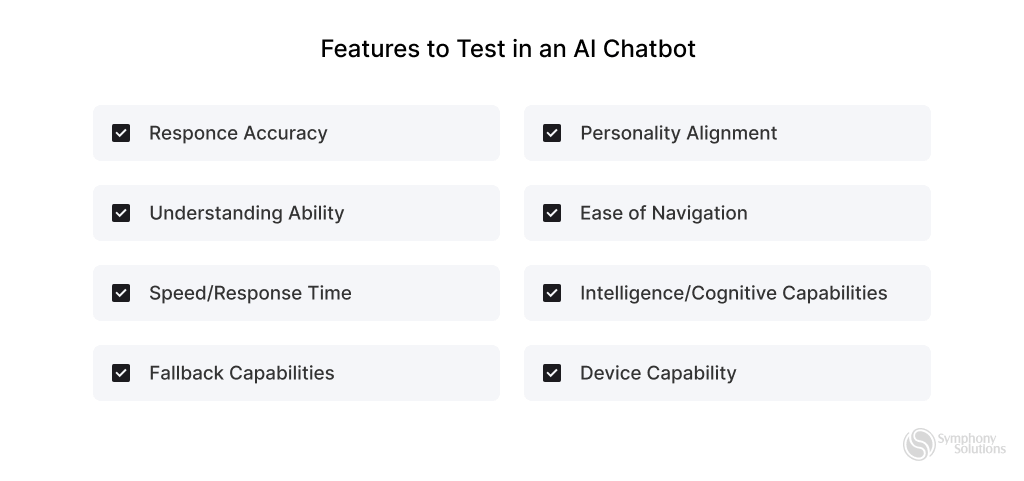
    Features to Test in an AI Chatbot 

    Now that we know the risks associated with deploying untested chatbots, here are some key areas to focus on when testing. 
    Features-to-Test-in-an-AI-Chatbot-

    Response Accuracy: Confirm the chatbot’s precision in correctly responding to user queries. 

    Understanding Ability: Evaluate how well the chatbot comprehends and interprets user input, ensuring accuracy in its responses. 

    Speed/Response Time: Measure the chatbot’s efficiency by assessing its response time to user interactions. 

    Fallback Capabilities: Test the chatbot’s ability to handle unexpected queries or errors, ensuring a seamless user experience. 

    Personality Alignment: Assess the chatbot’s tone and demeanor to ensure it aligns with the ongoing conversation or intended brand image. 

    Easy Navigation: Validate the chatbot’s user-friendliness and effectiveness in guiding users through conversations. 

    Intelligence: Evaluate the chatbot’s cognitive capabilities, including learning from interactions and adapting responses over time. 

    Device Compatibility: Ensure the chatbot operates seamlessly across various platforms and devices, maintaining a consistent user experience. 

    Explainability: The chatbot should be able to easily explain its decisions, making its processes transparent and building user trust. 

    Bias: It’s crucial to regularly test and correct the chatbot to avoid any biased responses, ensuring fairness for all users. 

    Scalability: As user numbers grow, the chatbot must remain fast and accurate, handling more interactions without a dip in performance. 

    Security: Enhance the chatbot’s security measures to safeguard against cyber threats, ensuring all user data is kept private and secure. 

    Types of Chatbot Testing 

    Initiating tests at different stages of AI chatbot development is crucial for ensuring a robust and effective conversational agent. Here are the key stages for running tests: 

    Pre-launch Chatbot Testing 

    General Testing: Assess basic functionality, like salutations, welcome messages, and questions, to ensure accurate understanding and responses across diverse scenarios. 

    Domain Testing: Evaluate proficiency in specific areas, e.g., customer support improvement, ensuring the chatbot handles queries within its domain effectively. 

    Limit Testing: Push the chatbot’s limits to determine its threshold for handling high volumes or complex conversations, ensuring stability during peak times. 

    Post-launch Chatbot Testing 

    A/B Testing: Compare versions to identify the most effective and user-friendly options, gathering insights to enhance overall performance. 

    Conversational Factors: Focus on improving the chatbot’s ability to engage in natural and empathetic conversations, refining tone, language, and context. 

    Visual Factors: Ensure an intuitive, visually appealing interface for a user-friendly experience, enhancing the overall post-launch user interaction. 

    RPA Testing (Robotic Process Automation): RPA testing evaluates the chatbot’s automation capabilities, ensuring seamless execution of routine tasks. This enhances efficiency and reliability, contributing to error-free chatbot services. 

    User Acceptance Testing (UAT): UAT involves end-users testing the chatbot in real-world scenarios to ensure alignment with their needs. It provides insights into user satisfaction, identifies usability issues, and ensures user-friendly and effective service.  

    Security Testing: Security testing assesses the chatbot’s resistance to vulnerabilities, safeguarding user data and ensuring compliance. This enhances overall security, instilling user trust and ensuring a robust and reliable service. 

    Adhoc Testing: Adhoc testing involves unplanned and exploratory testing to identify unforeseen issues. This comprehensive evaluation contributes to a more resilient and reliable chatbot service. 

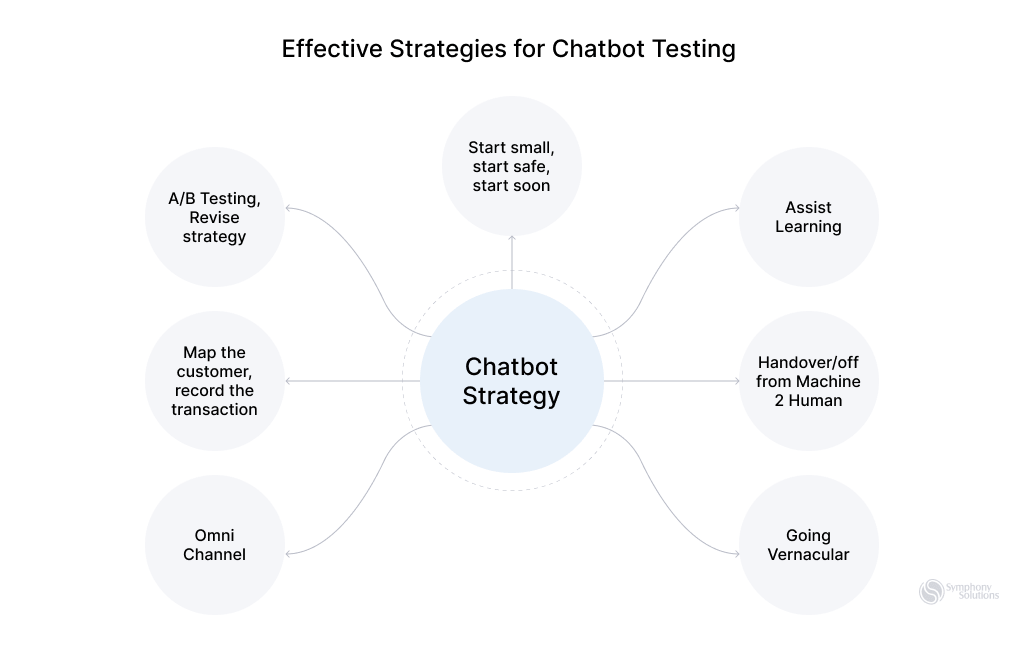
    Effective Strategies for Chatbot Testing 
    Effective-Strategies-for-Chatbot-Testing

    Here are some effective testing strategies to ensure chatbots function properly, provide accurate responses, and deliver a positive user experience. 

    Step 1: Requirements Gathering 

    This process involves identifying and understanding the specific functionalities and user interactions the chatbot is expected to perform. It sets the foundation for creating a focused and relevant testing plan, ensuring that the chatbot meets its intended purposes and operates effectively in its designated environment. 

    Step 2: Comprehensive Planning 

    Begin with thorough planning, defining the scope of testing. Identify key features like responsiveness, speed, and accuracy to maximize the testing process. 

    Step 3: Test Case Design 

    Develop effective test cases covering various scenarios, accommodating user intent variations and potential errors. Comprehensive test cases identify and rectify chatbot functionality weaknesses. 

    Step 4: Integration with Real User Scenarios 

    Integrate the chatbot with real user scenarios to create a realistic testing environment. Putting the chatbot into live scenarios, such as an app or webpage, where users interact will uncover functional, non-functional, and integration issues, allowing focused resolution for a user-centric experience. 

    Step 5: Performance Testing 

    Conduct performance testing to ensure seamless chatbot performance. Assess responsiveness under different loads and stress conditions, gauging scalability and response times. 

    Step 6: Natural Language Processing (NLP) Evaluation 

    Evaluate the chatbot’s language comprehension abilities, especially in interpreting ambiguous or complex user queries. Verify multilingual capabilities for a smooth conversational experience worldwide. 

    Step 7: Continuous Testing and Feedback 

    Implement a continuous testing and feedback loop post-deployment—user and beta tester feedback guide constant improvements, addressing potential issues for ongoing chatbot evolution. 

    Utilizing Testing Tools 

    Testing tools are one of the best ways to verify that your chatbot is up to standard. These tools come built-in with special functionalities that allow you to check the effectiveness of your chatbot under multiple scenarios. Some of these tools are low code, allowing QA teams to test their chatbots without coding experience. 

    Features of testing tools 

    • Automated test script and case creation. 
    • Testing across multiple channels (web chat, messaging apps, voice). 
    • Support for testing across different browsers and devices. 
    • Scalability testing with simulated user loads. 
    • Detailed test reports and analytics generation. 
    • Integration with CI/CD pipelines. 
    • Security testing measures. 

    Benefits of using testing tools 

    • Saves time and effort. 
    • Identifies performance bottlenecks easily 
    • Can cover a wide range of scenarios. 
    • Provides performance insights for continuous improvement. 
    • Reduces chances of human error. 
    • Supports validation under different conditions. 
    • Accelerates time to market. 

    Running A/B Tests 

    Running A/B tests with multiple scenarios is another effective way to validate AI chatbots. 

    A/B testing allows developers to experiment with different versions of the chatbot to identify which performs better. This iterative testing process helps optimize the chatbot’s design, functionality, and overall user experience. 

    Here are some best practices for effective A/B testing

    • Clearly outline the goals of your A/B test. 
    • Test one variable at a time to accurately identify the impact of specific changes. This might include testing different greetings, response options, or conversation pathways. 
    • Ensure a fair comparison by randomly assigning users to different chatbot versions. This helps control for biases and external factors that could skew results. 
    • Gather a sufficiently large sample size to ensure statistical significance. A smaller sample may not provide reliable insights, leading to inaccurate conclusions. 
    • Track relevant metrics, such as activation rate, fallback rate, retention rate, self-service rate, confusion triggers, etc. This data will help assess the performance of each chatbot version against the defined objectives. 
    • Analyze the results, identify patterns, and iterate on the chatbot design accordingly.  

    Automation in Chatbot Testing 

    Understanding when to implement chatbot testing automation is essential for optimizing efficiency. Consider automating your testing process in the following scenarios: 

    Post-Manual Testing Stability: Automation after manual testing has confirmed the chatbot’s stability, particularly for repetitive tasks and systematic processes. 

    Efficiency in Repetitive Tasks: Implement automation to enhance efficiency and reduce human error, especially when dealing with repetitive scenarios or large data volumes. 

    Frequent Updates: When your chatbot undergoes regular updates, automate testing to validate new features while ensuring existing functionalities remain intact quickly. 

    Increasing Complexity: As your chatbot becomes more complex, automate testing for intricate dialogue flows and backend integrations where manual testing may need to be improved. 

    Cost-Benefit Analysis: Automate if the benefits – such as time savings, broader coverage, faster deployment, and improved software quality – outweigh the costs. 

    When deciding to automate, selecting the right tool is crucial. Use the following criteria for your selection: 

    • Compatibility: Choose a tool that aligns with your chatbot platform and tech stack. 
    • User-Friendly Interface: Opt for an easy tool for developers and testers. 
    • Integration Capabilities: Ensure the tool integrates well with your CI/CD pipeline and version control systems. 
    • Cross-Platform Testing: The tool should support consistent performance across various devices. 
    • Reporting and Analytics: Select a tool with robust reporting features for better decision-making. 
    • Budget Considerations: Make sure the cost of the tool fits within your project budget. 

    Conclusion 

    Testing your AI chatbot is crucial to ensure it functions accurately and reliably before deploying it. By rigorously evaluating response accuracy, understanding, and adaptability, you can iron out potential issues, enhance functionality, and instill confidence in end users. 

    While this guide has covered the nitty-gritty of how to test your AI chatbot, it is best to work with experts to ensure that you get the best results, unless you have a qualified in-house team. For top-tier professional assistance and access to advanced testing tools and methodologies, consider exploring Symphony Solutions’ Software testing and QA services to learn more about how we can elevate your chatbot’s performance to the highest standards. 

    FAQs

  • QA Process in Agile: Specifics, Implementing, and Getting Benefits 

    QA Process in Agile: Specifics, Implementing, and Getting Benefits 

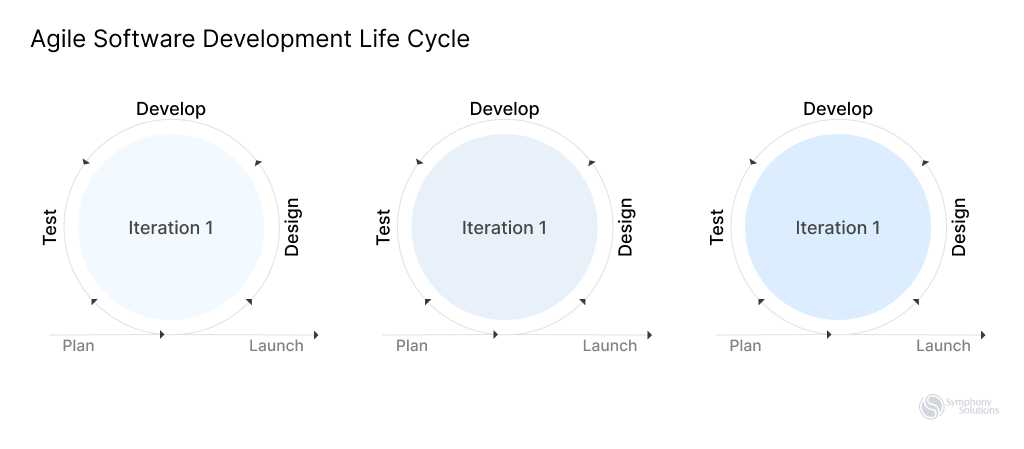
    Quality Assurance is an integral part of the Software development life cycle, which aims to ensure the software meets the defined quality standards and satisfies customer expectations. As software development is embracing the Agile way of working, it is natural to expect QA to do the same. This is where the Agile QA process comes into play, as the type of software testing that is contained within Agile principles and values. Implementing Agile QA processes brings you such benefits as accelerated release times, flexibility, reducing costs, ensuring acceptable quality, and making shorter feedback loops. 

    QA-Process-in-Agile

    Why Merge Agile With QA? 

    Quality assurance proves to be the most beneficial in an Agile environment. This stems from the concept of ‘Agile”, which requires frequent product releases and going through all the steps of full-cycle software product development upon each iteration. This makes the work of a QA engineer most fruitful and rewarding – since testing is done continuously and bugs are caught early on, the development team lowers the risk of encountering critical issues in the final stages of the project where the fix could be too costly or nearly impossible. Hence, many IT companies are embracing Agile and adopting it throughout organizations.

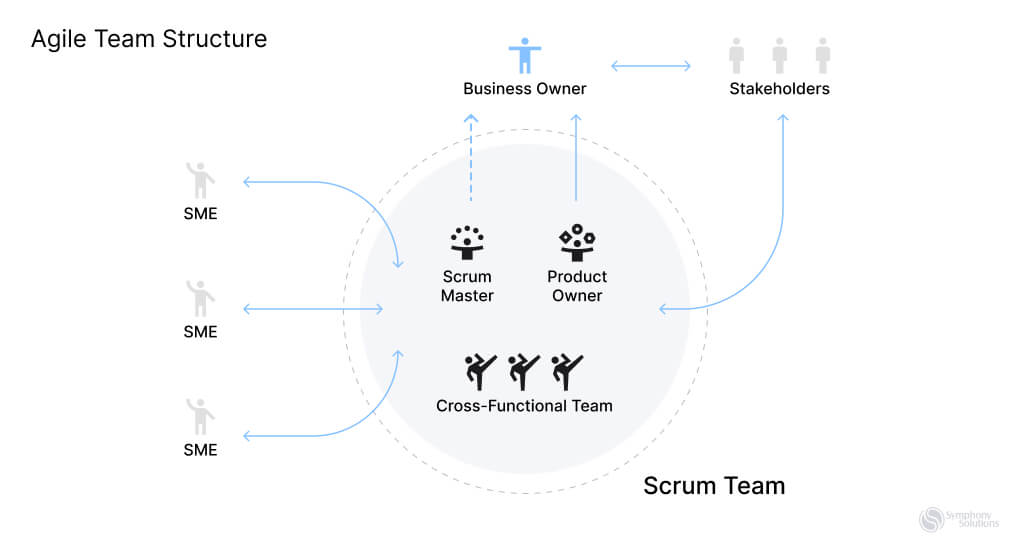
    Agile-Team-structure

    The Agile QA Process 

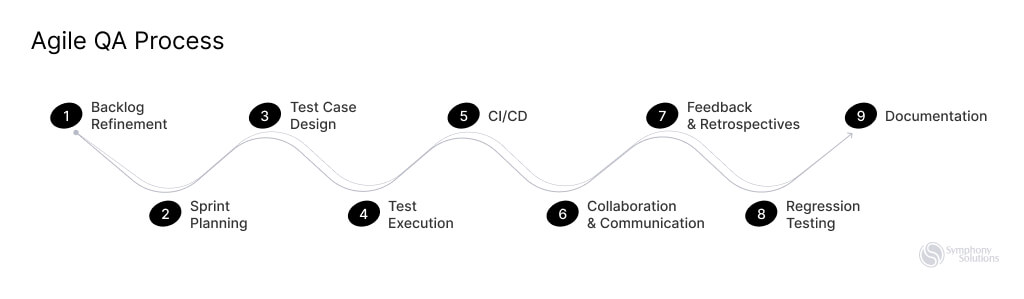
    The Agile QA process is a systematic approach to software testing that ensures the efficient and effective delivery of high-quality products. This process involves several key steps designed to address different aspects of the SDLC. 

    Agile QA process

    The Agile QA process is iterative and collaborative, integrating testing activities to ensure the efficient and effective delivery of high-quality products. Here are the key aspects of the Agile QA process: 

    1. Backlog Refinement 

    QA involvement begins during backlog refinement sessions, where user stories and acceptance criteria are discussed. QA provides input on testability and potential testing scenarios. 

    2. Sprint Planning 

    QA collaborates with the Developers and Product Owner to define acceptance criteria for user stories. Testing efforts and priorities are discussed during sprint planning. 

    3. Test Case Design 

    QA engineers design test cases based on acceptance criteria and user stories. These test cases cover functional and non-functional aspects of the software. 

    4. Test Execution 

    Test cases are executed during the sprint, focusing on both new and existing functionalities. Automated tests, if available, are also run as part of continuous integration. 

    5. Continuous Integration/Continuous Deployment (CI/CD) 

    QA integrates testing into the CI/CD pipeline to ensure automated testing is conducted consistently with each code change. This facilitates rapid and reliable software releases. 

    6. Collaboration and Communication 

    Continuous collaboration between QA, developers, and other stakeholders is emphasized. Regular communication ensures a shared understanding of requirements and feedback on testing results.  

    Daily Scrum meetings play a vital role, bringing teams together to discuss progress, challenges, and plans, promoting transparency and quick issue detection for aligned goal pursuit.  

    7. Feedback and Retrospectives 

    QA participates in sprint reviews, providing feedback on the software’s functionality and quality. Retrospectives are conducted to reflect on the testing process and identify areas for improvement. 

    • Sprint Review. After each sprint, a review meeting showcases completed work to stakeholders, gathering feedback for continuous improvement, refining the approach, addressing issues, and enhancing software quality in subsequent sprints.  
    • Sprint Retrospective. The Sprint Retrospective concludes the Sprint, where the Scrum Team reflects on individuals, interactions, processes, tools, and their Definition of Done. The aim is to plan improvements for increased quality and effectiveness. 
    8. Regression Testing 

    Continuous regression testing is performed to ensure that new code changes do not introduce defects in existing functionalities. 

    9. Documentation 

    QA contributes to documentation, including test plans, test cases, and any relevant testing artifacts. 

    While these activities are ongoing and may overlap, they collectively represent the Agile QA process.  

    Benefits of the QA Process in Agile 

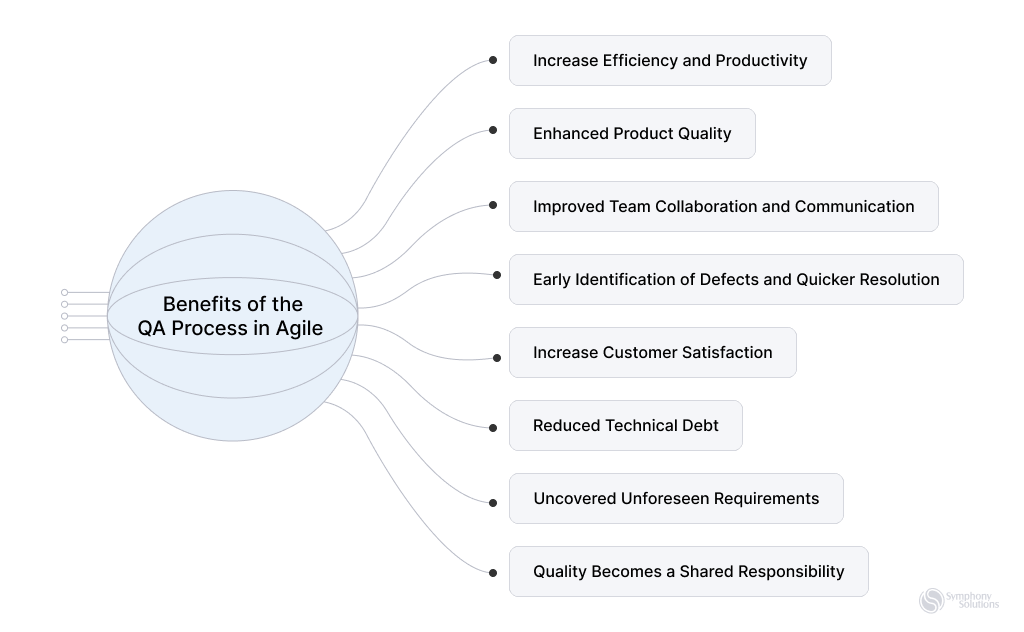
    The QA process in Agile offers numerous perks that impact both the development team and the end-users. With a well-established testing process and a cross-functional Agile team, you may expect to enjoy the benefits such as: 

    Benefits-of-the-QA-Process-in-Agile.
    • Increased Efficiency and Productivity. Implementing a structured QA process in Agile ensures that development teams work cohesively, avoiding bottlenecks and optimizing workflows. With clearly defined testing procedures and continuous feedback, tasks are streamlined, leading to increased efficiency and productivity. 
    • Enhanced Product Quality. One of the primary goals of QA in Agile is to maintain and enhance product quality. By conducting thorough testing at every iteration, QA teams can identify and fix issues early in the development cycle. This iterative approach results in a high-quality end product with fewer defects, providing a seamless user experience. 
    • Improved Team Collaboration and Communication. Agile QA promotes collaboration and open communication among team members. QA professionals work closely with developers, the product owner, and other stakeholders, fostering a collaborative environment. Regular meetings, such as daily stand-ups and sprint reviews, ensure that everyone is aligned, enhancing overall team synergy and efficiency. 
    • Early Identification of Defects and Quicker Resolution. QA in Agile allows for the early identification of defects due to continuous testing throughout the development process. This early detection is crucial, as it enables prompt issue resolution. Addressing defects in the early stages of development prevents them from accumulating and becoming more complex, ultimately saving time and resources. 
    • Increased Customer Satisfaction. A high-quality product that meets user expectations is essential for customer satisfaction. By implementing a robust QA process, Agile teams can deliver reliable and quality software. When customers receive a product that functions seamlessly and meets their needs, it enhances their satisfaction and builds trust in the development team and the organization as a whole. 
    • Reduced Technical Debt. Testing in Agile is done often and starts early on in the SDLC, which means bugs have less chance of lingering and causing issues in the future. The proactive approach leads to a more efficient codebase without shortcuts or quick fixes and ensures the long-term stability and maintainability of the software product. 
    • Uncovered Unforeseen Requirements.  QA processes contribute to predictable and consistent product delivery, which is achieved through continuous feedback loops and adaptive development practices that allow for the discovery and incorporation of unforeseen requirements. This iterative approach ensures that the product remains flexible, responsive to changing market demands, and capable of addressing evolving customer needs effectively. 
    • Quality Becomes a Shared Responsibility. Agile teams tend to be cross-functional, which for QA means that testability becomes a priority for each role. Product owner, developers, testers, and designers alike – all the people in these roles need to think about the product quality they are putting out and collaborate on improving the product in each step of the SDLC. Agile QA is an essential part of the process and not an afterthought. 

    Your expert Agile team will not only ensure the technical integrity of the software but also foster collaboration, efficiency, and customer satisfaction. These benefits contribute to the overall success of the project and the organization. 

    Best Practices for an Agile QA Process 

    Implementing an Agile QA process involves a set of best practices that enhance the efficiency and effectiveness of the development and testing cycles. Here are the best practices for an Agile QA process based on the provided outline: 

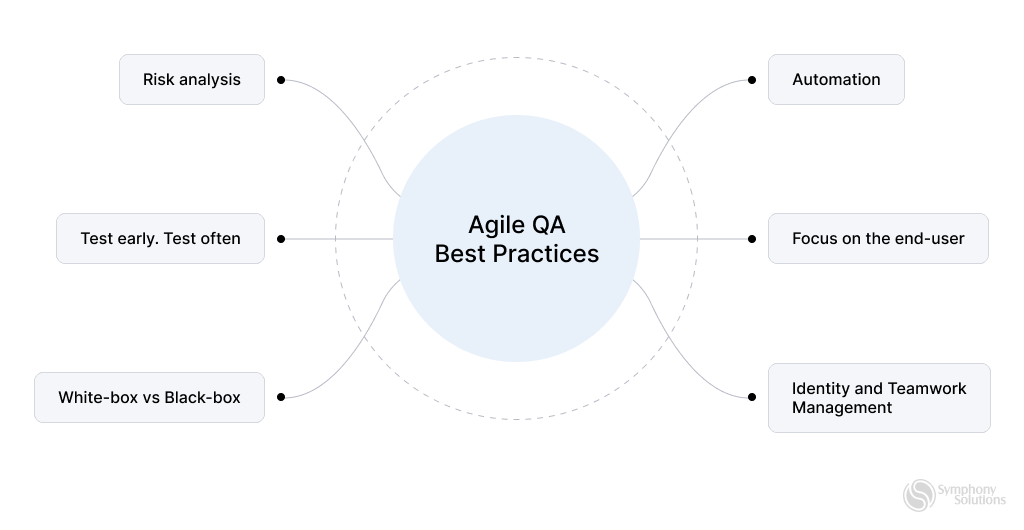
    • Risk Analysis. Conduct a thorough risk analysis at the beginning of each sprint. Identify potential risks and their impact on the project. Develop strategies to mitigate these risks and be prepared to adapt the testing approach accordingly. By proactively addressing risks, the team can minimize disruptions and maintain project momentum. 
    • Test Early and Test Often. In Agile, testing should start early in the development cycle and continue throughout the project. Encourage a “test-early” approach where test scenarios are created before the development begins. Additionally, conduct testing frequently during the sprint to identify issues promptly. Regular and continuous testing ensures that defects are caught early, reducing the likelihood of major setbacks later in the project. 
    • White-box vs Black-box Testing. Understand when to apply white-box (internal structure, code-driven) and black-box (functional, user-driven) testing techniques. Both approaches are valuable in different contexts. White-box testing is useful for verifying internal logic and code paths, while black-box testing validates the system’s functionality from an end-user perspective. Employing the right mix of these techniques ensures comprehensive test coverage. 
    • Automate, If Feasible. Automate repetitive and time-consuming test cases, especially those involving regression testing. Automation accelerates the testing process, increases test coverage, and allows the QA team to focus on more complex scenarios that require manual activities. However, it’s essential to evaluate the feasibility of automation based on the project’s requirements and priorities. 
    • Know Your Audience. Understand the end-users and their expectations. Tailor your testing efforts to match the user demographics and usage patterns. Knowing your audience helps in creating relevant test scenarios and ensures that the software meets user requirements, enhancing user satisfaction and product adoption. 
    • Teamwork. Promote collaboration and teamwork among developers, QA professionals, the product owner, and other stakeholders. Foster open communication channels, encourage knowledge sharing, and create a culture where feedback is valued. A collaborative environment facilitates quick issue resolution, efficient knowledge transfer, and a shared understanding of project goals, leading to a successful Agile QA process. 
    Agile-QA-Best-Practices

    These best practices are a sure way for Agile teams to establish robust QA processes that identify defects early but also foster collaboration and adaptability, align with user expectations and lead you to deliver high-quality software products. 

    How to Incorporate a QA Team Into an Agile Development Process 

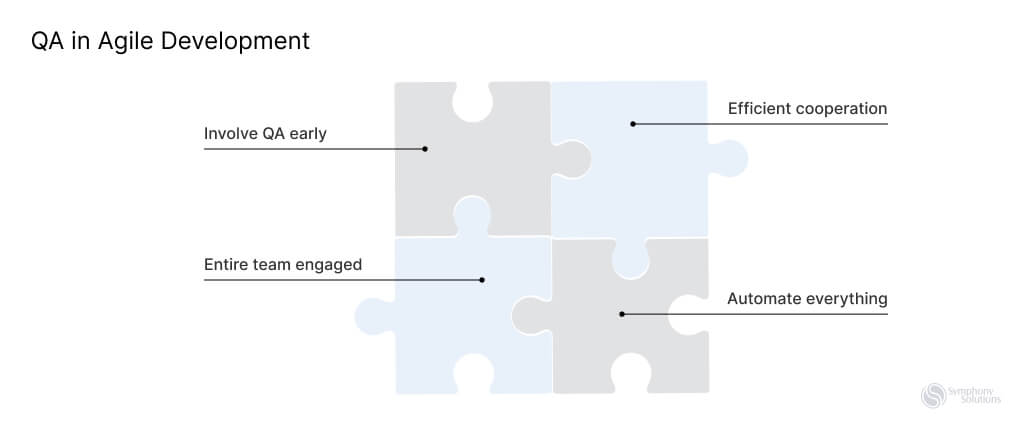
    In an Agile environment, the QA team works closely with development. Depending on the scale of the project, QA engineers can be part of the development team, or form a sub-division of the team. Either way, they are very involved in every step of the SDLC. Testing early on in the development process also helps significantly reduce expenses and delivery time. Here are a few tips on how to seamlessly introduce QA specialists to your Agile team to get the most out of their expertise: 

    • Allow testers to participate in every stage of software development. An involved QA team ensures that your software product is thoroughly tested and debugged to ensure customer satisfaction and profit.  
    • Engage everyone in the quality assurance process. In an Agile team, everyone is responsible for the quality of the product or software you are delivering, while the QA team organizes and improves processes to ensure an acceptable level of quality. 
    • Establish efficient cooperation between teams. Working with other departments can be crucial in collecting and addressing client’s requirements,  
    • Automate everything that can be automated. Many tasks that are too time-consuming, repetitive, or tedious can and should be automated via scripts or with the use of AI tools. In some cases, automation is the only way to do it, i.e. performance testing, security testing, regression testing, etc. 
    QA and agile development

    Summing Up

    Having established QA processes in Agile teams contributes to higher product quality, faster delivery, improved team collaboration, and enhanced customer satisfaction, ultimately leading to the overall success of the project and the organization. 

    Symphony Solutions prioritizes creating a flexible work environment with an emphasis on effective communication, results-oriented project management and adaptability to change. This enables us to implement effective quality control practices within our Software Testing and quality assurance services and deliver the highest quality products and solutions

  • Embracing Digital Assurance Into Your Organization

    Embracing Digital Assurance Into Your Organization

    The desire for top-tier digital experiences is growing among businesses as the digital world progresses. A report from ReportLinker captures this momentum, revealing that the digital assurance market surged from $4.9 billion in 2022 to $5.79 billion in 2023 — an impressive year-on-year growth of 18.0%. This trend reveals how organizations are increasingly prioritizing digital quality and excellence. 

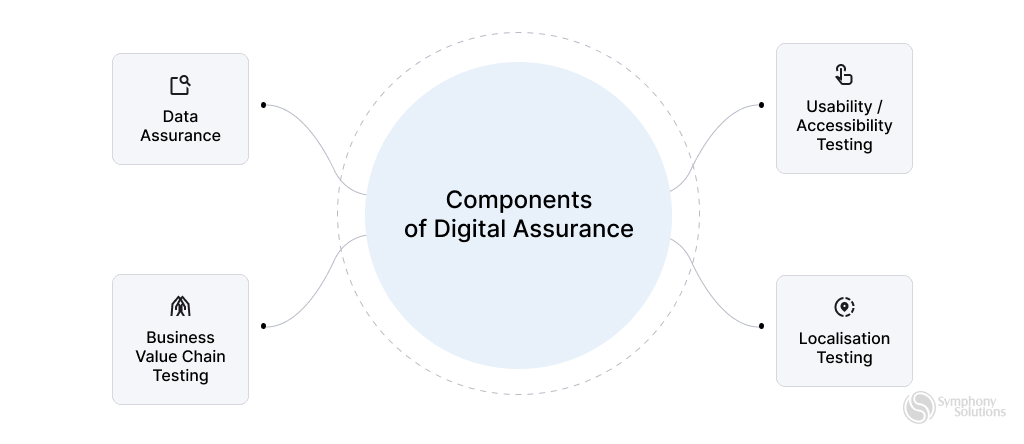
    But, what is digital assurance? Think of it as a promise — an organization’s commitment to delivering digital services that are reliable, user-friendly, and secure. Digital assurance goes beyond Quality Assurance by prioritizing user experience. It ensures seamless interactions within a digital ecosystem, integrating people, processes, and components across mobile platforms, analytics, cloud technologies, and data assurance, which safeguards data accuracy, completeness, and security. 

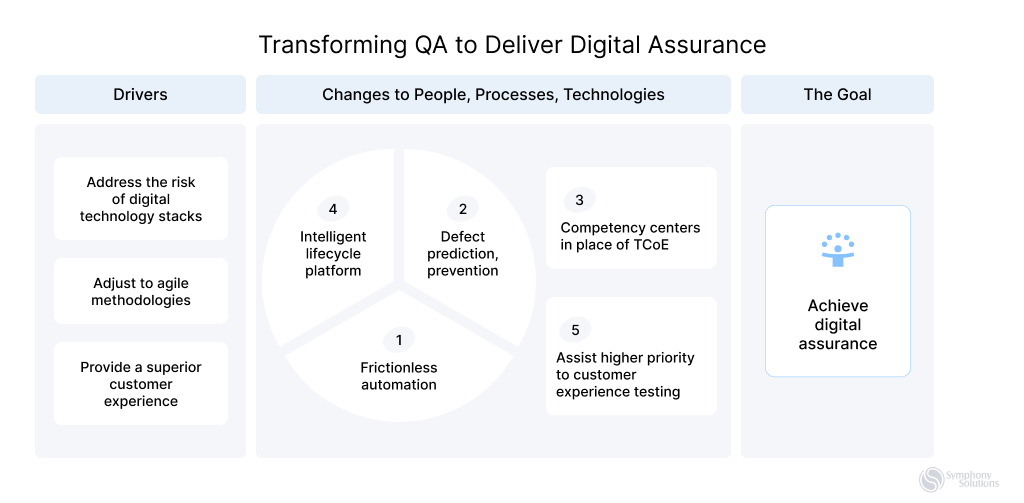
    Transforming QA to Digital Assurance

    Adding to the importance of digital quality assurance is the concept of transparency. What is digital assurance and transparency? It’s about instilling confidence in users, letting them know they’re in safe hands and that their data is treated with the utmost respect and integrity. Digital assurance and transparency go hand in hand. This article will explore the ins and outs of digital assurance, why it’s essential, and how organizations can embrace it effectively.  

    Benefits of Digital Assurance 

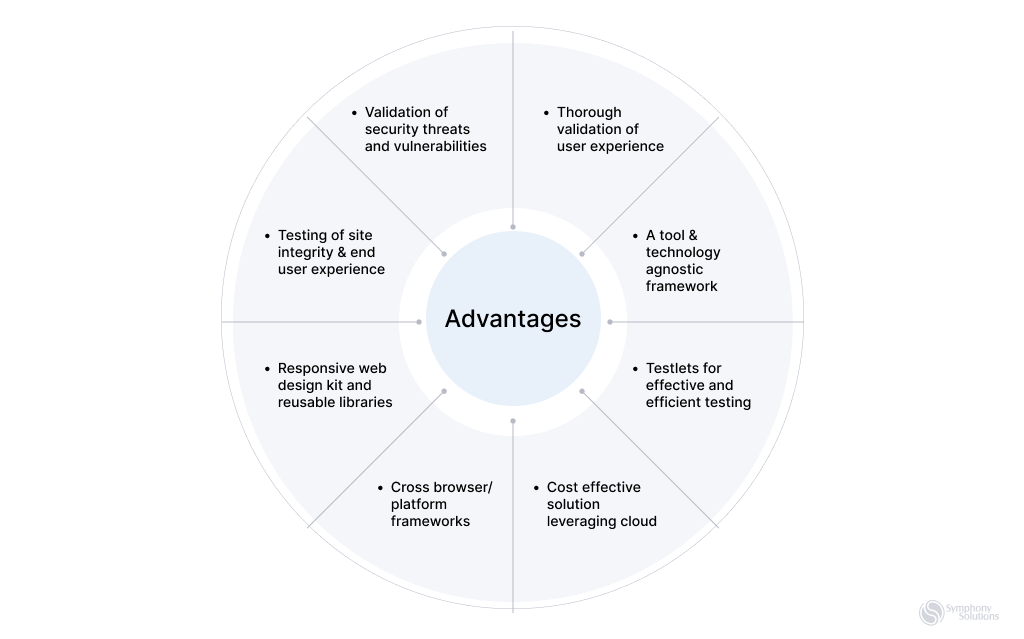
    digital assurance image - advantages

    Digital assurance brings a multitude of advantages to organizations, optimizing their operations and bolstering their success. Here are some of the benefits:  

    Optimal Utilization of Skills and Resources 

    Digital assurance allows organizations to leverage resources in the most cost-effective manner. For instance, a company might utilize cloud-based testing tools to ensure their mobile app functions seamlessly across different devices, saving both time and money. 

    Risk Identification and Mitigation 

    Through digital assurance testing services, potential pitfalls, such as security vulnerabilities in a new software release, can be identified early. Strategies, like penetration testing, can then be employed to counteract these risks, ensuring customer data remains secure. 

    Clear Accountability 

    With digital assurance, roles are distinct. For example, in a digital project, while developers focus on building features, quality assurance teams ensure these features meet the set standards, ensuring everyone knows their specific responsibilities. 

    Enhanced Workflow and Predictability 

    Digital assurance streamlines processes. A company launching a new website might use automated testing tools to quickly identify and fix bugs, leading to faster deployments and predictable launch dates. 

    Cost Efficiency 

    By employing digital assurance services, companies can avoid costly post-launch fixes. For example, catching a design flaw in the prototype stage of a product can save significant redesign costs later on. 

    Achieving Business Goals:  

    Digital assurance ensures alignment with objectives. An e-commerce platform, for instance, might prioritize a seamless checkout process to boost sales, ensuring that the digital strategy directly supports the business goal of increased revenue. 

    Consistent User Experience:  

    With digital assurance, companies can offer consistent experiences. For example, a banking app might use digital assurance to ensure that users have the same smooth experience whether they’re checking their balance or transferring funds. 

    Implementing Digital Assurance into Your Organization 

    Explore the following steps to effectively adopt digital assurance and enhance your digital initiatives: 

    Evaluating the Current Digital Assurance Capabilities of Your Company 

    Start by conducting a comprehensive audit of your existing digital platforms, applications, and services. This evaluation will provide a clear snapshot of your current capabilities. Additionally, gathering feedback from end-users, stakeholders, and internal teams can offer invaluable insights into their experiences and challenges.  

    Identifying Places That Need Work 

    Once you have a grasp on your current state, identify areas of improvement. Focus on addressing user feedback and auditing for pain points. Ensure your technology stack aligns with digital assurance goals and conduct thorough security assessments. Digital assurance testing is crucial for security and functionality. 

    Creating a Plan for Digital Assurance 

    With a clear understanding of where improvements are needed, it’s time to craft a strategic plan. Set clear, measurable objectives for what you aim to achieve with digital assurance. Whether your goal is to enhance user experience, bolster security, or expedite delivery times, having well-defined targets will guide your efforts. Given the areas that need work, prioritize tasks, ensuring that the most critical issues are addressed first. 

    Assembling a Squad for Digital Assurance 

    The success of your digital quality assurance efforts relies on the team behind it. Form a cross-functional team from development, testing, user experience, and security departments for a holistic approach. Invest in training, workshops, certifications, and sessions to equip them with the latest skills and knowledge. Digital quality assurance services are essential for success. 

    Utilizing Technologies and Instruments for Digital Assurance 

    Technology is the backbone of digital assurance. Embrace automation tools like Selenium for testing or JIRA for issue tracking to streamline processes. Performance monitoring is equally vital. Platforms like New Relic or Datadog can offer real-time insights into the performance of your digital assets, helping you identify and address issues promptly. On the security front, tools like OWASP ZAP can be invaluable for scanning vulnerabilities and ensuring robust protection. 

    Tracking and Measuring the Effectiveness of Digital Assurance Initiatives 

    As with any strategic initiative, measuring the effectiveness of your digital assurance efforts is paramount. Define key performance indicators (KPIs) that resonate with your objectives. These could range from reduced downtime and faster issue resolution to improved user satisfaction scores. Establishing a continuous feedback loop with users can offer insights into the impact of your initiatives.  

    Factors that Drive Organizational Adoption of Digital Assurance Initiatives 

    components of digital assurance

    Here are the factors that motivate organizations to embrace digital assurance initiatives: 

    Complexity of the Digital Landscape 

    Today’s digital ecosystem is vast and intricate, especially with the convergence of Social, Mobile, Analytics, and Cloud technologies. It’s essential that these elements align with organizational goals. Digital assurance ensures a cohesive and seamless interaction across all digital components. 

    Security Vulnerabilities in the Digital Space 

    In our interconnected era, the potential for security breaches is heightened. While interconnected ecosystems unlock numerous possibilities, they can also be vulnerable if not properly configured and tested. Digital assurance steps in to fortify security, protecting both organizational assets and user data. 

    Integration with Legacy Systems 

    For enterprises rooted in pre-digital times, transitioning isn’t just about technology—it’s about culture. As they integrate modern digital solutions, it’s crucial to ensure legacy systems are harmoniously incorporated. Digital assurance smoothens this transition, bridging the gap between the old and the new. 

    Impact of Digital on Customer Experience 

    Customer experience can be a make-or-break factor. As organizations deepen their digital footprints, maintaining consistent and optimal performance across all touchpoints becomes a challenge. Digital assurance focuses on refining these interactions, ensuring every digital touchpoint meets user expectations. 

    Agility in the Digital Era

    The ever-evolving digital world demands swift adaptability. Organizations must be prepared to quickly roll out updates or address issues. Digital assurance supports this agility, enabling businesses to adapt and evolve efficiently. 

    Digital Assurance Best Practices 

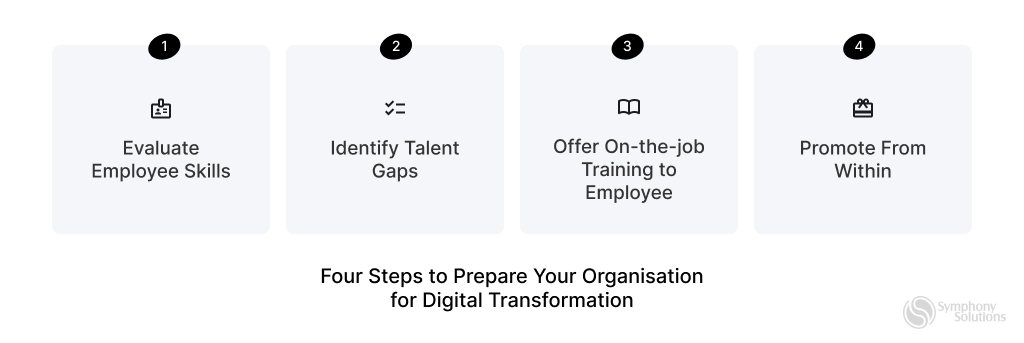
    steps to prepare your organisation for digital transformation

    Here are the key practices for effective digital assurance: 

    Integrate Digital Assurance Early in the Development Lifecycle 

    The earlier digital assurance is integrated into the development process, the better. By doing so, potential issues can be identified and addressed at the onset, reducing the likelihood of costly and time-consuming fixes later on. For instance, when developing a new mobile application, incorporating digital assurance during the design phase can help identify usability concerns, ensuring a smoother user experience upon launch. 

    Foster Collaboration Across Teams and Stakeholders 

    Digital assurance isn’t an isolated function; it requires collaboration across various departments, from development to marketing. Regular communication and feedback loops with all stakeholders ensure that everyone is aligned with the organization’s digital goals. For example, by collaborating with the marketing team, digital assurance professionals can better understand customer expectations and tailor their testing processes accordingly. 

    Stay Abreast of Emerging Technologies and Trends 

    The digital landscape is ever-evolving. To ensure that digital assurance practices remain effective, it’s crucial to stay informed about the latest technologies, tools, and industry trends. This might involve attending webinars, participating in workshops, or joining relevant online communities. By staying updated, organizations can leverage the latest tools and methodologies, ensuring that their digital assets are always at the forefront of innovation. 

    Continuously Review and Refine Digital Assurance Processes 

    The digital assurance journey doesn’t end once a system or application is launched. It’s a continuous process of review and refinement. Regular audits of digital assurance practices can help identify areas of improvement. This could involve revisiting testing protocols, exploring new automation tools, or seeking feedback from end-users. A commitment to ongoing improvement ensures that digital assurance practices remain robust and effective in delivering optimal digital experiences. 

    Conclusion 

    Adopting digital assurance empowers organizations to deliver reliable and superior digital experiences. With Symphony QA services, you can ensure reliability, meet user expectations, and elevate your brand’s reputation. Digital assurance is more than just a technical safeguard—it’s a strategic investment that boosts customer trust and drives organizational success in the digital age.  

  • Perfecting Automated Testing: Key Strategies for Success 

    Perfecting Automated Testing: Key Strategies for Success 

    With the rise of rapid deployment needs, seamless collaboration, and uncompromising quality requirements in software development, automated testing is gaining a crucial role. Automated testing provides a solution to these demands, making it a key player in the evolution of software development practices. 

    Automated testing is a driving force that allows organizations to reach optimal efficiency, reliability, and innovation in their software development ventures. Notably, automated testing diminishes the burdensome task of consistently testing code and bug fixes, making it not only achievable but also remarkably efficient, even with the high-speed nature of deployments. According to Forrester, automated testing cuts down testing efforts by a significant 75% and expedites time-to-market by an impressive 20%

    In this insight-packed article, we will explore automated testing in software development, revealing its full potential. We will delve into its transformative benefits, navigate through the challenges it presents, and share best practices that will equip your organization to harness the full power of automation. Gear up to embrace automation as we explore how it propels efficiency, elevates software quality, and lays the foundation for continuous enhancement in the dynamic realm of software development. 

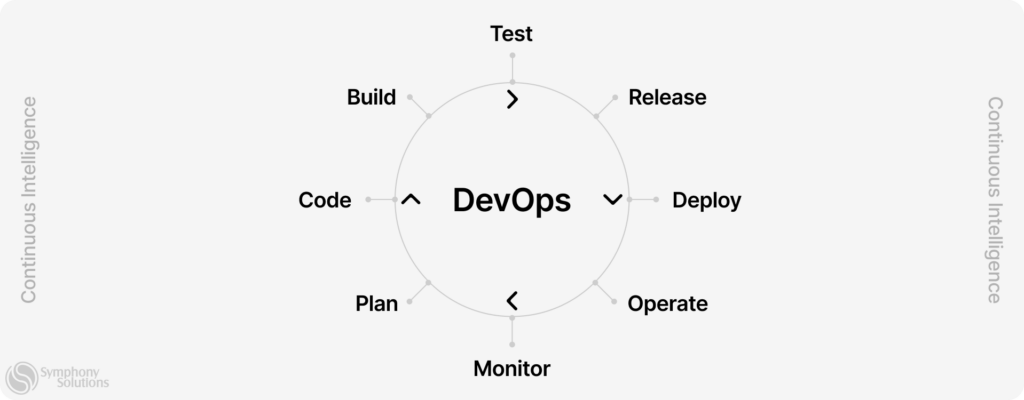
    devOps circle article

    Reasons why DevOps need Automated Testing 

    Test automation, which replaces more than 50% of manual testing efforts, is a crucial component of DevOps. The following reasons, complete with relevant examples, underline the importance of automated testing in DevOps: 

    1. Testing Challenges at High Deployment Rates 

    Continuous testing is a requirement in the continuous delivery and deployment environment of DevOps. Each code commit could potentially be shipped to production and needs to be of deployable quality. It’s challenging, if not nearly impossible, to continuously test code and code fixes at the high rate of deployment seen in DevOps. 

    Automated testing efficiently addresses this challenge. It executes a large number of complex tests in every build cycle, and can even parallelize test execution across different systems or environments. This enhances the overall test coverage and ensures each code iteration is tested comprehensively before it advances in the delivery pipeline. 

    Consider a microservices architecture where each service is developed, updated, and deployed independently. Manual testing in this scenario would significantly delay deployment. However, automated tests can verify each service’s functionality in real-time and efficiently handle the load of inter-service communication checks. 

    2. QA Teams Lagging in Delivery Chain 

    The concept of “shifting left,” integrating testing early and often in the development lifecycle, has gained prominence with the advent of CI/CD. Traditional QA practices, however, may struggle to keep up with this rapid integration and delivery rhythm. Automated testing can bring QA teams up to speed within the DevOps process, reducing the risk of a lag in the pipeline. 

    For instance, when working on a new feature that requires frequent codebase updates, QA teams relying on manual testing might constantly trail behind. By automating tests, the QA team can seamlessly integrate into the development process. Tests can be triggered with every commit, instantly verifying each change’s functionality and alerting the team to any potential issues. 

    3. Inconsistent Practices & Temporary QA Teams 

    Ensuring the stability and reliability of software requires consistency in testing. Ad-hoc QA teams may lack a standardized approach, leading to variability in testing practices and potential gaps in the test coverage. Automating tests with the best QA approach guarantees that every test follows a specific, predefined procedure, thereby ensuring repeatability and consistency. 

    Take the case of a multinational organization developing an application across different locations. Manual testing practices might differ from one team to another, leading to inconsistent results. An automated testing framework ensures uniformity in testing procedures across all teams, which helps maintain consistent quality standards. 

    4. Long Feedback Cycles Hurting Speed 

    One of the major advantages of DevOps is the faster feedback loop. However, manual testing, due to its time-consuming nature, can delay this feedback cycle. Automated testing addresses this issue by providing immediate feedback. Tests are triggered automatically whenever code is committed or changes are integrated, enabling a “fail fast” approach. 

    Consider a team working on an e-commerce application that needs rapid feature updates to stay competitive. Manual testing could delay the feedback, causing developers to push less-tested code into production to meet deadlines. Automated testing drastically shortens the feedback loop, enabling developers to find and fix bugs before they reach the production environment, thus ensuring high-quality, reliable updates. 

    Key Components of Automated Testing 

    key components of devOps

    1. Test Automation Framework 

    A Test Automation Framework is the set of guidelines or rules used to produce beneficial results from automated testing activity. It includes practices, test-data handling methods, object repositories, coding standards, and procedures to follow while crafting and executing test scripts. 

    Frameworks such as Data-Driven Testing, Keyword-Driven Testing, and Hybrid Testing Framework offer different approaches based on the requirements of the software and the testing team. Choosing the right framework not only increases test speed and efficiency but also reduces maintenance costs and allows for better reusability of test cases. 

    2. Test Scripts 

    Test scripts are the sequences of instructions that an automated test will follow. Written in a scripting or programming language like Python, Ruby, Java, or a specialized language like Selenium’s Selenese, these scripts define what actions the test should take on the application. 

    A well-structured test script includes setup procedures, actions to perform during testing, assertions or checkpoints to verify the outcomes against expected results, and cleanup procedures. They should be easy to read, modular, and maintainable to ensure long-term usefulness. 

    3. Automation Tools 

    Automation tools, also known as Test Automation Software, are applications that automate the process of testing in software development. They manage and conduct test cases, compare the results with the expected outcomes, and generate reports. 

    The choice of automation tool largely depends on the nature of the project, the programming language used, budget constraints, and specific needs of the project. Tools like Selenium, Appium, JMeter, and Cucumber are widely used for different types of automated testing like functional testing, performance testing, or acceptance testing. 

    4. Test Data 

    Test Data forms an integral part of automated testing. It’s the data that the automated tests use to input into the software under test. Creating and managing test data is a critical aspect of a robust automation strategy. 

    Effective test data management includes identifying the type and amount of data needed for each test case, creating a mechanism for data setup and teardown, and implementing strategies to handle data variability between different test environments. For certain tests, test data management tools might be used to generate, mask, or subset data. 

    5. Reporting and Analytics 

    Reporting and analytics wrap up the automated testing process. They provide a comprehensive view of software quality, test coverage, and areas that need attention. 

    Reports generated after test execution include the number of tests passed, failed, or skipped, along with detailed error logs for failed tests. Modern testing tools often provide visual analytics, giving teams a better understanding of the testing process and helping them make informed decisions. 

    Benefits of Automation in DevOps Testing 

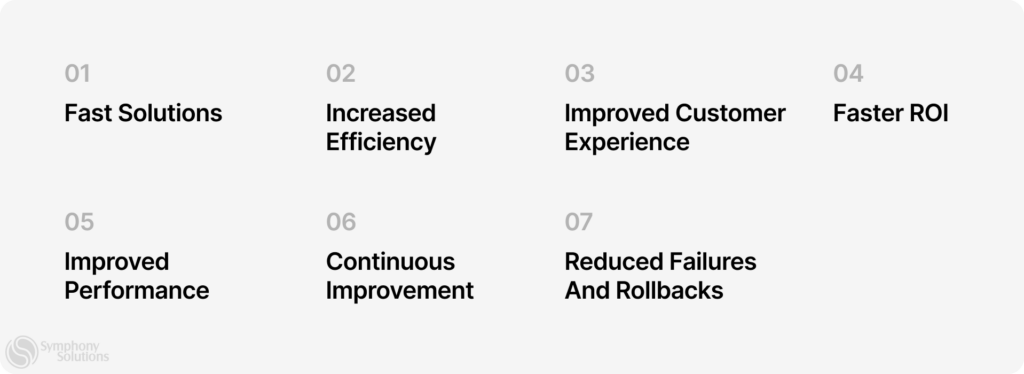
    benefits of automation

    According to a recent study, 85% of DevOps teams report “improving product quality” and “time to market” as the top benefits of test automation. Below, we explore these and other benefits of automated DevOps testing services. 

    Streamlining Processes for Greater Efficiency 

    In the rapidly evolving technological landscape, test automation refines the testing process by eliminating manual, repetitive tasks. Test scripts are crafted to handle a wide array of scenarios and executed in parallel, significantly saving time and effort. This bolstered efficiency allows development and QA teams to focus on critical aspects of testing, such as complex scenarios and exploratory testing. For instance, automated regression tests can be scheduled to run overnight, resulting in a set of results ready for analysis and action by morning. 

    Accelerating Development Cycle Times 

    Automated testing plays a pivotal role in reducing testing cycles and providing rapid feedback on code changes. By spotting issues early, these automated processes allow for quicker bug fixes and prevent potential delays in deployment. Such rapid responsiveness lets organizations deliver updates and new features at a much faster pace. An e-commerce company, for example, can swiftly test and deploy new payment gateways using automated tests, enhancing customer experience. 

    Reducing Human Error with Automation 

    Manual testing, while necessary, is susceptible to human error, and the monotony of repetitive tasks can lead to oversight. In contrast, automated testing ensures consistent and accurate test execution, significantly reducing the chance of human-induced errors. This can help identify and report defects that might go unnoticed during manual testing, thus leading to a higher software quality. For instance, complex algorithms in a financial application can be automatically tested, thereby reducing the risk of calculation errors. 

    Enhancing Teamwork Through Shared Understanding 

    Automated testing fosters improved collaboration and communication among developers, testers, and other project stakeholders. A common framework and test suite encourages a shared understanding of test cases, expected outcomes, and requirements, facilitating more effective communication. Such shared understanding can lead to quicker bug resolution and alignment of expectations. For example, tools providing detailed test reports and logging can improve team communication, making the debugging process more efficient. 

    Assuring Consistent Performance Under Diverse Conditions 

    Automated testing confirms software performance across various configurations, platforms, and environments. By conducting tests under diverse conditions, organizations can identify compatibility issues, thereby ensuring the software behaves as expected under different conditions. This is particularly crucial for applications serving large user bases or expected to handle high volumes of traffic. Automated load testing, for example, can simulate thousands of concurrent users accessing a web application, enabling organizations to pinpoint and address performance bottlenecks before they impact the end-users. 

    Best Practices for Embracing Automation in DevOps Testing 

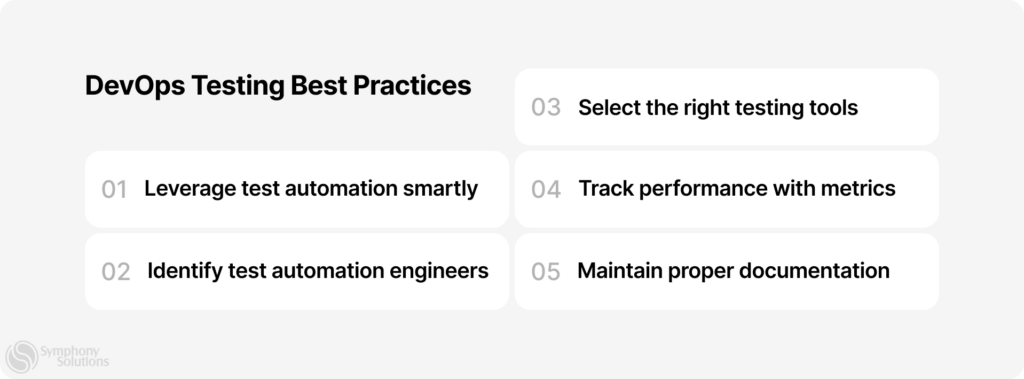
    devOps testing best practice

    Here are the DevOps testing best practices to achieveoptimal testing efficiency:  

    Choosing the Right Tools and Technologies 

    Selecting the appropriate automation tools and technologies is crucial for successful DevOps testing. Different tools excel in specific areas, such as functional testing, performance testing, or API testing. It’s important to evaluate and choose tools that align with the project’s requirements and team expertise. For instance, tools like Selenium WebDriver and Cypress are popular for web application testing, while tools like JMeter and Gatling are widely used for performance testing. 

    Integrating cutting-edge technologies like containerization and virtualization can further enhance the efficiency of automated testing. For example, utilizing Docker containers can help create isolated and reproducible testing environments, enabling parallel test execution across multiple configurations. 

    Creating a Robust Testing Framework 

    A well-designed testing framework provides a foundation for efficient and maintainable automated testing. It should offer flexibility, scalability, and reusability. A modular approach allows for building reusable components and libraries that can be easily combined to create comprehensive test suites. By following the principles of separation of concerns, tests become more maintainable and adaptable to changes. 

    Additionally, incorporating design patterns like Page Object Model (POM) or Behavior-Driven Development (BDD) helps in creating clear and readable test scripts. These patterns enhance collaboration between developers and testers, enabling a shared understanding of the application’s behavior. 

    Implementing Effective Test Automation Strategies 

    Successful test automation requires careful planning and strategizing. It’s crucial to identify the most critical and frequently executed test cases to prioritize automation efforts. Start by automating core functionality, critical workflows, and areas prone to regression bugs. This ensures that essential aspects of the application are thoroughly tested and validated with each release. 

    However, it’s important to strike a balance and avoid excessive test automation. Not all tests are suitable for automation, such as exploratory or usability tests that require human judgment. A thoughtful combination of automated tests and manual testing helps achieve comprehensive coverage and ensures optimal quality. 

    Ensuring Proper Integration with the DevOps Pipeline 

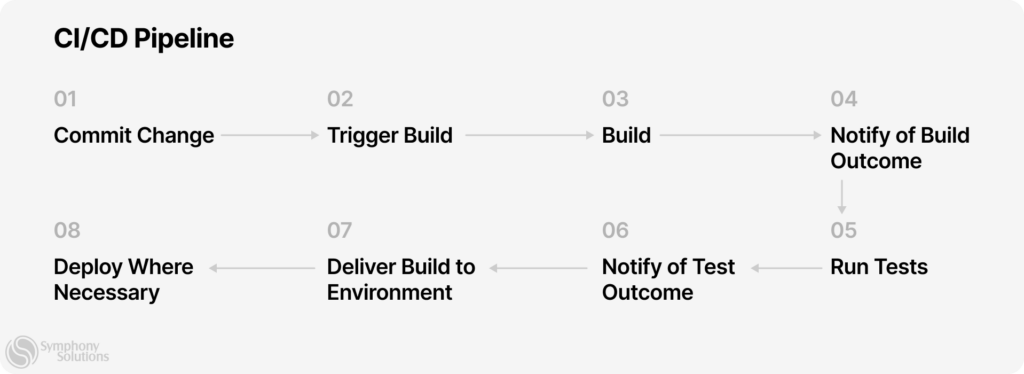
    Integrating automated testing seamlessly into the DevOps pipeline enhances the efficiency and reliability of the overall software delivery process. Automated tests should be integrated at various stages, including continuous integration, continuous delivery, and continuous deployment. This ensures that every code change undergoes automated testing and receives immediate feedback. 

    For instance, using continuous integration tools like Jenkins or GitLab CI/CD, automated tests can be triggered upon every code commit, preventing the integration of faulty code into the main branch. Integration with the deployment pipeline ensures that only thoroughly tested and validated code gets deployed to production. 

    Leveraging Metrics and Analytics to Optimize Testing 

    Metrics and analytics provide valuable insights into the effectiveness of the testing process and help optimize test suites. By collecting and analyzing data from automated test runs, teams can identify patterns, trends, and bottlenecks. This information guides decision-making in improving test coverage, identifying flaky tests, and enhancing overall test efficiency. 

    For example, tracking metrics like test execution time, test failure rates, and defect detection rates allows teams to identify areas that require attention or optimization. It enables them to prioritize efforts, allocate resources effectively, and continuously improve the testing process. 

    List of DevOps testing tools 

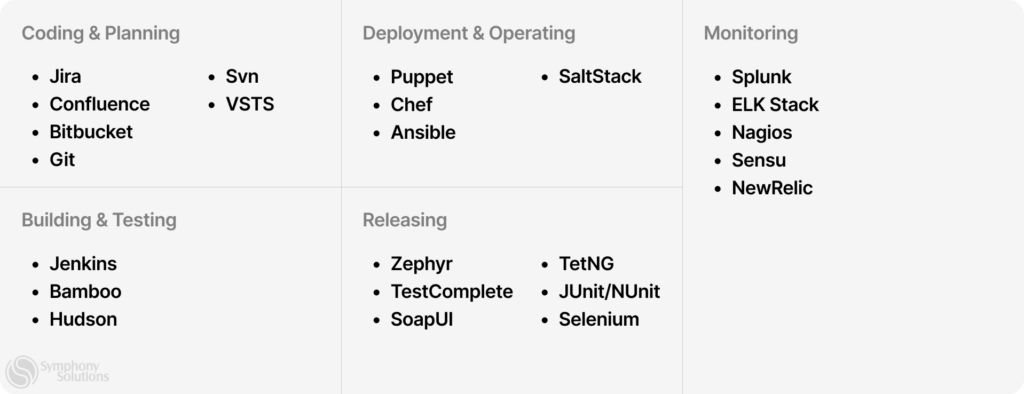
    list of devOps tools

    Finding the right DevOps testing tools is one of the most significant challenges DevOps teams face. In fact, 71% search for new tools several times per year. Hereare some of the commonly used DevOps testing tools, 

    Jenkins 

    Jenkins is a popular open-source automation server that supports continuous integration and delivery. It allows developers to automate the building, testing, and deployment of their software projects. For example, Jenkins can be configured to trigger automated tests whenever changes are pushed to the code repository, providing rapid feedback on code quality. 

    GitLab CI/CD 

    GitLab CI/CD is a robust continuous integration and delivery platform integrated with the GitLab version control system. It allows teams to automate the software development lifecycle, including testing, building, and deploying applications. With GitLab CI/CD, developers can define pipelines that automatically execute tests, ensuring that code changes are thoroughly validated before being deployed. 

    Selenium 

    Selenium is a widely-used open-source testing framework for web applications. It provides a suite of tools and APIs that enable automated browser testing across different platforms and browsers. For instance, teams can use Selenium to create test scripts that simulate user interactions and validate the functionality and responsiveness of web applications across multiple browsers. 

    JMeter 

    JMeter is an Apache open-source tool for load testing and performance measurement of applications. It allows developers and testers to simulate high loads on web servers, databases, and other resources, measuring the application’s performance under different scenarios. With JMeter, teams can identify performance bottlenecks and ensure that their applications can handle expected user traffic. 

    Docker 

    Docker is a popular containerization platform that simplifies the deployment and management of applications. It provides a lightweight and isolated environment for running applications and their dependencies. In the context of testing, Docker allows teams to create reproducible testing environments, ensuring consistency across different stages of the development process. 

    Ansible 

    Ansible is an open-source automation tool that allows teams to define and manage infrastructure as code. It simplifies the deployment and configuration of applications across multiple servers and environments. In testing, Ansible can be used to automate the provisioning of test environments, making it easier to set up and tear down testing environments as needed. 

    Puppet 

    Puppet is a configuration management tool that automates the provisioning and management of infrastructure resources. It allows teams to define infrastructure configurations as code, making it easier to maintain consistency across different environments. In testing, Puppet can help ensure that the testing environments are properly configured and ready for executing automated tests. 

    Chef 

    Chef is another popular configuration management tool that enables teams to define infrastructure configurations as code. It provides a way to automate the deployment and management of applications and infrastructure resources. In testing, Chef can be used to ensure that the required software dependencies and configurations are in place for running automated tests consistently. 

    Nagios 

    Nagios is an open-source monitoring tool that helps teams monitor the health and performance of their systems. It provides alerts and notifications for any issues or abnormalities detected in the infrastructure. In testing, Nagios can be used to monitor the test environment, ensuring its stability and availability during test execution. 

    ELK Stack 

    The ELK Stack is a combination of three open-source tools: Elasticsearch, Logstash, and Kibana. Elasticsearch is a powerful search and analytics engine, Logstash is a log data processing tool, and Kibana is a data visualization and reporting platform. Together, they form a comprehensive solution for collecting, analyzing, and visualizing logs and other data. In testing, the ELK Stack can be used to aggregate and analyze test logs, helping teams gain insights into test results and identify potential issues. 

    Graylog 

    Graylog is an open-source log management platform that allows teams to collect, index, and analyze log data. It provides centralized log management capabilities, making it easier to search and correlate logs from different systems. In testing, Graylog can help aggregate and analyze test logs, enabling teams to identify patterns, 

    Challenges and Limitations of Automation in DevOps Testing 

    Let’s see some DevOps testing challenges below: 

    Overcoming Resistance to Change 

    Implementing automated testing in a DevOps environment can face resistance from team members who are accustomed to traditional manual testing methods. For example, some testers might be concerned that automated testing will render their skills obsolete or reduce the importance of human intervention. Overcoming this resistance requires a shift in mindset and demonstrating the value of automation. By showcasing how automated Devops testing solutionsimprove efficiency, enable faster feedback cycles, and allow testers to focus on more complex scenarios, teams can embrace automation as a valuable addition to their skill set. 

    Ensuring Proper Training and Skills Development 

    Effective implementation of automated testing requires the development of new skills and knowledge within the team. Providing comprehensive training programs and workshops can empower team members to embrace automation. For instance, conducting hands-on sessions on popular test automation frameworks like Selenium or Cypress, or providing training on scripting languages such as Python or JavaScript, equips testers with the necessary skills to create and maintain automated test scripts. Encouraging collaboration and knowledge sharing within the team can also foster skill development and ensure a smooth transition to automated testing. 

    Managing Complex Testing Environments 

    DevOps environments often involve complex architectures and multiple interconnected systems, making test environment management challenging. To address this, teams can leverage containerization technologies like Docker or Kubernetes. By encapsulating the application and its dependencies within containers, it becomes easier to create consistent and isolated testing environments. For example, using Docker containers, each service in a microservices architecture can be tested in an independent, reproducible environment. This ensures that automated tests run consistently regardless of the underlying mature DevOps infrastructure or system configurations. 

    Addressing Security and Compliance Concerns 

    Automation should not overlook security and compliance requirements. Ensuring the security of the test environment and protecting sensitive data used in tests are critical considerations. For instance, implementing encryption and anonymization techniques can help protect sensitive information during testing. Furthermore, compliance with industry regulations and standards should be incorporated into the automated testing process. Test scenarios can be designed to validate security measures, such as authentication, authorization, and secure data transmission, ensuring that the software meets the required security and compliance standards. 

    The Takeaway 

    Embracing automation in the DevOps testing process represents not only a technical paradigm shift but also a transformative mindset change that empowers teams to continuously deliver high-quality software. By investing in automation, organizations can achieve faster time-to-market, improved software quality, optimized resource utilization, and gain a competitive edge in the market. Ultimately, it is through the seamless integration of automation into the DevOps testing process that businesses can realize their full potential and thrive in the ever-evolving realm of software development. 

  • Reasons Why Quality Assurance is Important and the Business Benefits It Brings to Your Business 

    Reasons Why Quality Assurance is Important and the Business Benefits It Brings to Your Business 

    Gartner’s recent eye-opening research revealed that 88% of service leaders are failing to meet customer expectations when it comes to product quality – with the poor-quality assurance processes being the main culprit. But what exactly is quality assurance, and why should you care?  

    At its core, quality assurance in software testing is a systematic process that ensures a software product meets the predetermined quality standards and user expectations. This proactive discipline is integrated into every stage of the software development lifecycle, with the goal of identifying and addressing potential issues before they become problems.  

    From the initial design phase to the final deployment, QA in software testing involves meticulous planning, execution, and reporting of tests to verify the software’s functionality, performance, and usability. It’s not just about finding and fixing bugs, but also about enhancing the overall user experience and ensuring the software delivers the intended value to its users. The ultimate objective of QA in software testing is to instill confidence in the software, assure its reliability, and improve customer satisfaction. 

    In this article, we’ll take an even closer look at the importance and benefits of quality assurance to your business. But before we begin, let’s clarify the difference between QA and quality control (QC) 

    Quality Assurance vs. Quality Control: What’s the Difference?  

    Quality control (QC) and  quality assurance are strategies for launching high-quality digital products and services, but their methodologies and focus are different.  

    QA takes a proactive approach that broadly translates to ongoing and consistent improvement of software development processes. Software quality control, on the other hand, is reactive and focuses on the product. QC further extends to monitoring, evaluating, and testing a software solution to single out errors and correct them for premium quality standards.  

    From a business perspective, QA is a preventive strategy that drives the desired quality standards in a digital solution to enhance customer satisfaction, retention, and quality. On the other hand, quality control is a corrective strategy that aims to lower customer churn rates, complaints, or even refunds due to unmatched expectations.  

    Quality assurance vs quality control

    The Typical Quality Assurance Process for Any Project 

    The process of QA can vary accordingly, depending on the software, business, or industry in question. Nonetheless, it typically involves several key steps for any product, including the following:  

    Requirement Analysis  

    The team begins with a thorough analysis of the project’s requirements to determine the testable expectations and the types of tests needed. This stage also involves preparation of the Requirement Traceability Matrix (RTM) and feasibility analysis automation.  

    Test Planning  

    Any quality assurance operation includes careful test planning, highlighting the steps needed and how the testing strategy will be executed. Technically, this stage involves creating a viable test plan, defining the testing goals, and researching the tools and resources needed for QA testing.  

    Test Case Development  

    After planning, QA experts proceed to design test cases for different scenarios based on the technical requirements and specifications of the IT solution in hand. This technically entails creating test cases and automation scripts, generating test data, as well as reviewing and baselining test cases. 

    Test Environment Setup  

    Test environment setup is a crucial stage in a typical testing process, which defines the optimum hardware and software conditions for running tests on a work product. The deliverables for this phase include a testing-ready environment with complete data setup and smoke test results to assess the readiness of the environment.  

    Test Execution  

    This stage involves executing the test cases designed in the step above for verification purposes to ensure that the software system functions as intended. Ideally, your QA expert will run several high-level tests, document the results, and map defects to test cases. Retesting also happens at this stage, where a regression test is performed to verify that the raised issues have been addressed accordingly.  

    Test Cycle Closure   

    The QA testing team finally ends the process with a test cycle closure, which technically reviews the overall effectiveness of the approach taken. Prevalent activities that happen in this phase include test results evaluation, defect reporting, test metrics preparation, and generation of the test cycle closure report.  

    Depending on the organization’s policy, the QA process can be done internally by in-house staff or externally by third-party companies. Either way, the QA and software development teams should jointly propose how the issues are remediated.  

    Importance of Quality Assurance  

    QA is a crucial process in software engineering. It helps development teams identify potential defects at an early stage, reducing the risk of such defects being overlooked and affecting the end-users after release and in production. If neglected, high chances are that the organization’s product will be unreliable, defective, or unfit for the intended function. This can translate to a tainted business reputation, wide-scale dissatisfaction, or lost revenues in the long haul.   

    Benefits of Quality Assurance for Project Success 

    As noted earlier, QA is a critical step that ascertains whether every component in a software system follows a specific predefined standard. Internally, quality assurance tests various attributes, including structure, complexity, scalability, and flexibility. From the user’s perspective, the process evaluates efficiency and reliability.  

    That said, here are the benefits of quality assurance in driving project success:  

    Drives Greater Efficiency  

    Any organization’s goal is to foster efficiency at all business levels, from production to usage. Best QA practices can help your software development team identify coding patterns that may lead to potential errors or bugs. This ensures that your team works with clean, high-quality code for greater efficiency.  

    Enhances User Experience 

    One of the key benefits of quality assurance in software development is that it enhances user experience by driving a consistent and high-quality output. Such an experience meets the average consumer’s expectations, promoting greater satisfaction and loyalty.  

    Saves Time and Money  

    Integrating quality assurance with software development can help your team reduce the time spent debugging or rectifying defects. This means more speed and agility during the process to accelerate the time-to-market when the demand is still hot. Eventually, faster deployment translates to more saved time and money.  

    Security  

    Quality assurance in software testing can help enhance the security of your software products. The process aims to identify any security blind spots and/or vulnerabilities during development and preventing hackers from attacking the released product. In turn, this reduces the likelihood of security incidences for better regulatory compliance and safe operation.  

    Maintain Regulatory Compliance  

    QA ensures that your software solution follows all the standards and requirements set by established regulatory bodies, such as the International Standardization Organization (ISO), among others. For example, QA promotes careful documentation development process documentation to ensure compliance with ISO documentation standards. It also facilitates internal audits for continuous improvement and all-around compliance.   

    Competitive Product  

    Another benefit of QA is it allows scalability testing, allowing development teams to build highly scalable digital solutions that can handle dynamic demands depending on traffic or usage. This gives you a competitive edge with a product that can penetrate any market and expand its user base over time.  

    Protects Brand Image and Reputation  

    Besides meeting consumer expectations by fostering a consistent experience, quality assurance also plays an integral role in guaranteeing product quality to protect the brand image and reputation.  

    For instance, the process mitigates potential risks that can cause outages or failure after deployment. It also enhances swift response to issues, demonstrating an organization’s unwavering commitment to quality standards and customer experience.   

    Mitigates Failure  

    The primary function of quality assurance in any software development is to mitigate potential failures and guarantee the product’s functionality. In other words, taking this approach means verifying that the solution meets user needs and rectifying any errors that can lead to limited functionality.  

    Ensures Long-Term Profits  

    Organizations with high-quality products are likely to experience more purchases than their counterparts with inferior products. A thorough QA evaluation ensures that your software solution meets expectations to please users at the initial experience. These users will likely remain loyal to your digital solution and drive repeat business, direct referrals, and long-term profits.  

    Why Your Business Needs to Implement a QA Role  

    Establishing a QA role in your business comes with various benefits, including fostering a positive work environment where employees can thrive. Besides creating a channel for ongoing feedback and improvement, implementing quality assurance processes exposes your team to new tools, technologies, and techniques. Ultimately, this leads to higher job satisfaction.  

    On top of that, quality assurance processes entrench an organization’s commitment to quality standards. In such a setting, employees tend to develop a result-driven mindset instead of a job-driven one. In other words, the whole team will embrace QA as a principle and not a routine checkmark.  

    QA is also important as it drives customers’ loyalty. Prioritizing quality and users’ feedback means your business is grounded on keeping promises, a culture that puts your brand ahead of the competition.  

    What to Focus on During QA Evaluation  

    A typical quality assurance program should be tailored to complement an organization’s goals. Here are some tips highlighting what you should focus on for a successful quality assurance process. 

    quality assurance checklist

    Determining the Cause of the Problem  

    Develop a systematic approach to isolate the problem. You can do this by gathering as much information as possible and analyzing data before forming hypotheses. After that, test the hypotheses to reveal the root cause of the problem.  

    Analyzing the amount of engagement and effort needed to fix the problem  

    Examine the scope of the problem by breaking it down into manageable parts. This should be followed by complexity estimation and consideration of the expertise level required. Lastly, calculate how long each problem takes to fix and gauge the total effort required.  

    Defining the most effective way of fixing it 

    You might wonder, what is the role of formal documentation in quality assurance? Well, this gives you a roadmap for fixing everything effectively. Moreover, this approach organizes the testing process to optimize it.  

    Considering possible backfires upon making changes 

    The best way to identify possible backfires after making changes is by testing the changes. This helps you understand whether the remediation measures can potentially break the existing functionality or user experience.  

    Quality Assurance Methods  

    Now that you understand what is the role of quality assurance, which techniques can you employ to ensure that your project follows a fault-free software development process? Here are popular methods to get you started:  

    Failure Testing  

    Also known as fault injection testing, this QA method introduces defects to the software solution to ascertain whether it can handle the vulnerabilities. The benefit of this method is it allows testers to design various testing scenarios and simulate them at both small and large scales.  

    After the tests are complete, developers can analyze the results to reveal areas where the system failed to handle the injected faults and implement remediation measures as much as needed. Finally, the method ends in other rounds of iterating and retesting to ensure effective remediation measures.  

    Statistical Process Control 

    As the name suggests, this method drives quality assurance by gathering and analyzing data to monitor and control the overall software development process. Technically, the method involves establishing control limits on historical data, current user needs, or industry standards for a consistent output.  

    The QA team then performs data analysis within the control limit boundaries to identify any defects that may pose a challenge in the future. If the analysis falls beyond the control limits, your development team may need to implement corrective measures before another round of monitoring to refine the process.   

    Total Quality Management  

    Total Quality Management (TQM) is a QA approach that includes inculcating a culture of quality standards that every aspect of the organization must meet. To achieve long-term product success, this method emphasizes the inclusion of various key aspects, including teamwork, customer focus, and ongoing improvements.  

    The method also extends to software development process management, where various techniques, such as Lean or Six Sigma, can be incorporated to identify areas of improvement.  

    Models and Standards  

    Organizations can also leverage international models and standards to ascertain whether their software solution’s structure, security features, and data control permissions are consistent for compliance. Prevalent models employed to drive QA in software development include waterfall, agile, spiral, RAD, and prototype.  

    Standards can be categorized into quality and testing guidelines. Industry-recognized quality standards include ISO/IEC 15504, ISO/IEC 12207, IEEE 829, IEEE 29119 and ISO/IEC 25010:2011.  

    Company Quality 

    Organizations can also implement quality assurance as a strategy to meet dynamic consumer needs and expectations. In this method, an organization defines its quality standards by setting performance, user experience, compliance, security, and durability parameters.  

    This is followed by developing a plan that outlines QA best practices and processes to be followed to ensure that all software products are consistent with the set standards. Moreover, this method can also include ongoing employee training and inspections by external auditors.  
    Wrapping It Up 

    It is the goal of any organization to launch stable and reliable digital solutions. Implementing quality assurance as a crucial set of processes can assist your project in accomplishing its objectives and satisfying customers’ needs. Most importantly, QA is associated with greater efficiency, productivity, and reduced cost. That said, a well-implemented QA process in software development can always ensure that you consistently meet or exceed your customers’ expectations.  

  • Using ChatGPT for Software Testing and Test Automation 

    Using ChatGPT for Software Testing and Test Automation 

    Following its successful launch on November 30, 2022, ChatGPT shattered industry benchmarks, amassing an impressive user base of over one million within its inaugural week. This generative AI technology has since showcased its robust potential across a broad array of technical and creative tasks. From developing meticulously curated articles, devising intricate machine learning algorithms, to automating data analysis workflows, it has made significant strides. 

    The question thus arises: does artificial intelligence extend its capabilities to encompass software testing and test automation as well? For starters, it is essential to lay down a solid foundation of the concept of software testing before we delve into its potential intersection with artificial intelligence.  

    What is Software Testing 

    Software testing entails using manual procedures or automated tools to verify if software, a product, or its components meet the expected requirements and operate as intended. While software testing encompasses a diverse array of types, the two most prevalent ones are manual and automated testing. However, for the purpose of our discussion today, we will focus on automated software testing. 

    Within the Software Development Life Cycle, test automation or automated testing implies conducting tests, controlling test data, and using the derived results to boost software quality, all while decreasing human involvement. This methodology substantially fortifies the quality assurance process. Nonetheless, it’s worth mentioning that a comprehensive and robust quality assurance procedure requires the concerted oversight of the production team, regardless of the robustness of automated testing. 

    What is ChatGPT and How Will it Help With Test Automation 

    ChatGPT, a product of OpenAI’s ingenuity, is an advanced conversational artificial intelligence model that utilizes the architecture of the Generative Pre-Trained Transformer (GPT). Rooted in the realm of natural language processing (NLP), it employs sophisticated deep learning techniques to decipher and comprehend the intricacies of natural language. 

    To truly appreciate its potential role in software testing, it’s essential to delve into its applications, merits, constraints, and prospective influence within this domain. This exploration will provide a comprehensive understanding of how this cutting-edge AI model could revolutionize the landscape of software testing. So, without further ado, let’s dive deep into this fascinating topic. 

    functional-non-functional-testing

    Benefits of Using ChatGPT for Software Testing Process and Test Automation 

    Here are some benefits of using ChatGPT for software testing and test automation 

    It has enabled testers and developers to create test cases and test data without manual intervention.  

    ChatGPT leverages its natural language processing capabilities so that testers and developers can generate test cases and data using natural, easy-to-understand language commands. 

    The test cases and data are tailored to your specific needs since ChatGPT understands the requirements of the software it’s testing. This has helped reduce the time and effort required to create cases manually and ensure they cover all necessary scenarios. 

    Additionally, ChatGPT generates easy-to-understand test scripts to automate the testing process. The clear instructions and step-by-step guides from the artificial intelligence testing tutorial ensures that the testing process is streamlined and efficient and that the scripts remain accurate and effective. 

    Low risk of error, less time and effort  

    With ChatGPT, you can automate test cases using natural language commands to reduce the risk of errors compared to manual cases. This is because natural language commands are easier to understand and interpret than complex programming code and are less prone to errors. 

    Also, ChatGPT automatically executes test cases based on natural language commands, which saves time and effort that would otherwise be required for manual execution. This automation process also ensures that test cases are executed consistently and accurately, with minimal errors or oversights. 

    Since ChatGPT generates clear reports based on the results of the automated test cases, testers, and developers quickly identify any bugs in the software and take corrective action. 

    Identify potential issues and defects earlier 

    By analyzing results with natural language processing, ChatGPT detects patterns and trends that may reveal fundamental issues in an application. For example, if a specific feature consistently fails, ChatGPT analyzes the data and identifies potential causes of the problem, like a bug in the code or a problem with the foundational framework. 

    ChatGPT’s machine learning capabilities can learn from past results and identify patterns that indicate potential issues or defects after a thorough result analysis. This allows ChatGPT to become increasingly accurate and effective at identifying potential problems over time. 

    chatgpt-401-error

    ChatGPT can be a valuable tool for software testing, particularly in natural language processing (NLP). Testers can interact with ChatGPT to evaluate its responses and identify areas for improvement. 

    Did you know testers can use ChatGPT to generate automated test cases based on specific requirements? They also interact with ChatGPT to refine cases and ensure all possible scenarios are covered. Then, ChatGPT analyzes the results and generates reports that are easy to understand, highlighting any issues that require further attention. 

    ChatGPT also identifies gaps in test coverage by analyzing the natural language used in requirements and identifying areas where you may need additional testing. This information will then be used to adjust the testing strategy to ensure all possible cases are covered. 

    Moreover, this artificial intelligence (AI) in software testing can assist in data generation to ensure that the data is accurate and relevant. So, by interacting with ChatGPT and evaluating its responses, testers identify areas where the NLP model requires improvement. This feedback informs the model modification to improve its accuracy and effectiveness over time. 

    Generate realistic test data for software products that require a vast amount of data for performance testing. 

    ChatGPT’s natural language processing abilities benefit software products that require a large amount of data, including addresses, names, contact information, for performance testing. It employs natural language requirements to create test data that simulate user behaviors. This ensures that the performance testing covers all possible scenarios. 

    The generated data mimics real-world scenarios and covers all possible cases, including those that might cause the system to malfunction or break down, which will be challenging to create manually. 

    Also, the generated data may be customized to include specific data types, ranges, and formats to ensure it is accurate and relevant to the software product’s requirements. 

    For example, if you want to format the test plan to input data and track bug like Jira or Github, you may leverage ChatGPT by prompting further in the same message thread for this scenario: 

    Prompt: “Prepare a test case table to enter into Jira tickets.” 

    ChatGPT

    chatgpr-jira-tickets

    Train Chat GPT to create test cases 

    Suppose a software product requires multiple test cases to cover different features, functionalities, inputs, outputs, and error handling. In that case, Chat GPT will create these relevant cases by understanding the natural language requirements. 

    The generated test cases cover the edge cases and error scenarios that are hard to create manually, so the system is thoroughly tested, and every case is covered. 

    The testers also interact with Chat GPT to analyze its responses and identify the areas that require improvement. This enhances the system’s accuracy and relevance in generating cases that meet all requirements over time. 

    test-automation-process

    Possible Use Cases of ChatGPT in Automation Testing: 

    Here are some ways ChatGPT can be employed in automation testing:  

    Building automation test cases for different scenarios 

    Chat GPT helps the testers create test cases and write scripts that include all ranges of scenarios and edge cases based on the user stories. It analyzes the natural language input to generate a human-like response so even non-technical stakeholders can participate in the testing process. 

    You can now describe the scenario in English, and ChatGPT will automatically give corresponding test cases and scripts. For example, you can create cases for different requests, like ideas for testing a banking transaction. 

    Test Data Generation 

    ChatGPT excels in generating synthetic test data that encompasses various scenarios and edge cases. Leveraging its language understanding capabilities, it can simulate user inputs, API responses, or database records with diverse data combinations. This feature enables testers to create comprehensive test data sets for more thorough and effective testing. By automating the generation of test data, ChatGPT reduces the reliance on manual data creation, increases the efficiency of test execution, and ensures a broader coverage of test scenarios. Testers can benefit from the ability to quickly generate large volumes of realistic test data, which aids in identifying potential issues and uncovering hidden defects. 

    regression-testing

    Delivering easy-to-understand code and clear instructions on how to use the developed code. 

    When developers write codes using natural language commands, ChatGPT employs its natural language processing capabilities to translate into actual programming code that is easy to understand. In addition to this, ChatGPT can offer insightful comments about potential problems with code snippets. It has been trained on a broad spectrum of coding problems and solutions, which enables it to identify potential issues and suggest improvements.  

    Whether it’s a logic error, an inefficient approach, or a potential security risk, ChatGPT can provide valuable feedback to help users refine their code. It analyzes the code from multiple perspectives, mimicking the code review process conducted by experienced developers. This feature, coupled with its ability to generate documentation and write unit tests, makes ChatGPT an excellent coding assistant, helping developers write better, more reliable code. 

    Also, ChatGPT provides real-time feedback to developers as they write code, allowing them to understand what they are doing and make any necessary corrections before the code is deployed.  

    In addition to providing feedback to developers, ChatGPT assists in the software testing for AI based mobile software apps by generating test cases and scripts that are easy to understand and follow. 

    Limitations of Using ChatGPT for Software Testing and Test Automation 

    Unfortunately, there are limits to the functions of ChatGPT for software testing and test automation. Here are some limitations:

    Potential bias and limitations in understanding certain contexts 

    ChatGPT cannot recognize the context or purpose of software applications. As a result, incorrect responses may arise during software testing. 

     One of the biggest challenges of ChatGPT as one of the artificial intelligence testing tools is that it is heavily dependent on statistical patterns. This learning model employs statistical models to generate the next words based on the information consumed. However, there is no fundamental understanding of those words. 

    This means that ChatGPT’s responses can’t be trusted when the user’s questions or statements require understanding a context that has not yet been explained. 

    Limited Generation of Test Cases 

    ChatGPT’s output may not always be comprehensive or relevant to build those edge tests and cases for the corner scenarios during software testing. 

    The GPT-3.5 language model, established several years ago, is a deep-learning language model that was trained on a multitude of human-generated content datasets. Due to the time and data constraints during its training period, there may be scenarios it hasn’t encountered, leading to responses that could be inaccurate or outdated. 

    On the other hand, ChatGPT-4, the latest iteration, brings a significant leap in efficiency and relevance. Leveraging more recent and diverse data, it provides a more accurate understanding of newer contexts and concepts. This advanced model has been fine-tuned to ensure more precise, up-to-date, and insightful responses, making it a powerful tool in today’s rapidly evolving digital landscape. 

    Inability to Understand Code 

    While it is true that ChatGPT, like many automated testing tools, doesn’t “understand” code in the human sense, it is capable of analyzing and interpreting the code within a given context. Coding is indeed an integral part of software testing, and while ChatGPT’s analysis might not replace a human developer’s comprehensive understanding, it provides valuable insights that help identify potential defects or bugs. 

    When it comes to generating code, ChatGPT might produce incomplete snippets. That means, depending on ChatGPT alone for complete code development could pose challenges. As a developer, it is crucial to comprehend the generated code, customize it to meet specific requirements, and complete it where necessary. 

    Despite these limitations, it’s important to note that ChatGPT provides a significant value-add in code analysis. It can scrutinize the code and recommend users on potential problems and issues. This ability to examine and provide constructive feedback makes it a valuable tool in the development process, contributing to the creation of more robust and reliable software. 

    Lack of Execution power 

    ChatGPT can provide particular test suggestions for execution. But since this artificial intelligence for software testing doesn’t understand code structures, it cannot execute the tests.  

    Software testers still have to implement and evaluate the tests manually to spot these hidden factors that could cause an app to fail and subsequently find solutions. 

    How ChatGPT Can be a Game Changer for Software Testing 

    chatgpt-for-automation-testing

    Here are some ways ChatGPT can transform software testing :

    Automation of Repetitive Tasks 

    It’s not automation in the traditional sense of controlling hardware or software directly, but rather, it’s about automating the intellectual work involved in software testing. 

    Take data entry and verification, for instance. ChatGPT can be programmed to generate and verify vast amounts of test data based on given parameters, thereby significantly reducing the time and effort required for these tasks. Similarly, for test data generation, ChatGPT can quickly produce a variety of test cases based on the software requirements and scenarios provided to it. 

    The automation here relates to ChatGPT taking over tasks which are repetitive in nature but require a degree of intellectual work – tasks that would otherwise be performed by human testers. The AI’s ability to handle these tasks not only improves efficiency but also allows human testers to direct their focus on more complex and creative aspects of testing. 

    Reducing Human Error 

    By automating these tasks, ChatGPT also plays a critical role in lowering the chances of human error. Manual handling of repetitive tasks can sometimes lead to oversights or inaccuracies, particularly when dealing with large volumes of data or complex test cases. The use of ChatGPT in these scenarios minimizes the risk of such errors, leading to more accurate and reliable testing outcomes. 

    Boost test execution speed  

    Unlike manual testing, where testers may take a considerable amount of time to execute test cases, artificial intelligence methods in software testing can manage multiple test cases simultaneously, saving time and cost and increasing efficiency. 

    ChatGPT also analyzes test results in real-time, providing immediate feedback to testers and helping them to identify potential issues and defects as soon as they occur. This allows testers to take corrective action quickly and avoid significant problems later in the testing process, saving time and resources. 

    With the help of ChatGPT, some tasks will be automated, thus accelerating the test execution process. It generates test cases automatically by analyzing the software requirements and creating a comprehensive suite of cases that cover all requirements. 

    ChatGPT can generate test cases for various requests, including: 

    • Sample data for a website login form 
    • Testing ideas for an eCommerce transaction 
    • Test data to reset password 

    Prompt: “Generate some test cases for a feature that allows users to reset their password.” 

    ChatGPT

    chatgpt-test-cases

    Along with that, it will reduce the requirement of manual testing, which will encourage testers to give time to complicated tasks.  

    With ChatGPT handling mundane testing tasks, testers devote their time to more complicated testing activities that require critical thinking and human intelligence. 

    Manual testing is time-consuming and tedious, and errors are inevitable due to human fallibility. But with ChatGPT, you can automatically generate cases by analyzing software requirements, ensuring that test cases cover all requirements. This significantly reduces the risk of human error and ensures that the most critical aspects of the software are thoroughly tested. 

    ChatGPT can provide accuracy and consistency in smoothly running the test cases. 

    Once test cases are integrated into the system, the testing process becomes more precise, reliable, and repeatable. 

    This feature is particularly useful in identifying inconsistencies in the software’s behavior and addressing them promptly. Consequently, this helps to save time, as cases can be executed quickly and repeatedly. This speed and accuracy allow for the prompt detection of bugs and other issues, enabling developers to take corrective action early in the development cycle. 

    End Note 

    ChatGPT has many benefits that help development teams improve their software product quality. By automating repetitive tasks and reducing the risk of human error, artificial intelligence for software testing can provide faster and more accurate test results. 

    However, its significant limitations suggest a need for an alternate approach for test automation like Symphony! Symphony increases the speed of software testing without compromising its best practices on quality assurance, accuracy, and efficiency approaches. Don’t hesitate to reach out to our QA consultants today for our expert advice on how to effectively use AI-powered QA automation tools in the delivery of your new product. 

  • Everything You Need to Know About Cloud Vulnerability Scanning  

    Everything You Need to Know About Cloud Vulnerability Scanning  

    Businesses of all sizes are moving to the cloud to escape the high risks and costs associated with physical data storage solutions. However, 68% of organizations note that cloud account breaches still present huge security risks, especially when sensitive company data is involved. That’s why cloud vulnerability scanning is imperative, especially if you’re going to mitigate threats before they actually happen. 

    This article takes an in-depth look into vulnerability scanning, prevalent cloud risks, tips on choosing the best cloud vulnerability scanner, and ideal options in the market. Take a deep dive to learn more.   

    What is Cloud Vulnerability Scanning? 

    This entails the process of using vulnerability scanning tools to identify, report, and mediate prevalent security risks in your cloud platform. Regular cloud scanning for vulnerabilities and proactive management minimizes the risks of cyber breaches on your data or application.  

    Most Common Cloud-Based Vulnerabilities 

    Cloud platforms face various vulnerabilities that expose them to cybersecurity risks when neglected. Prevalent vulnerabilities that can be identified by a scanner and subsequently addressed and managed include:  

    Vulnerable APIs 

    Cybercriminals are increasingly targeting outdated APIs to gain access to valuable business information. In most cases, a vulnerable API lacks proper authentication or authorization protocol, granting access to anyone on the internet.   

    Weak Access Control 

    Improper access management means that unauthorized users can access your cloud data effortlessly. Failing to disable access to past employees or inactive users (employees on leave or with reassigned roles) can also expose your storage solution to vulnerabilities.  

    Misconfigurations  

    A cloud vulnerability example that often culminates in big data breaches is a misconfiguration. Technically, a misconfiguration happens when there is a glitch in one or multiple of the security measures implemented to safeguard the cloud. Misconfigurations can either be internal or external, especially if you have third-party integrations.   

    Data Loss or Theft 

    Data loss in terms of deletion or alteration can jeopardize your storage and other applications that connect to cloud servers. Stolen data might also reveal sensitive information, such as access credentials, which can be exploited to paralyze your operations in the cloud.  

    Distributed Denial-of-Service Attacks and Outages 

    Distributed denial-of-service (DDoS) attacks are malicious efforts to take down a web service such as a website. It works by flooding the server with requests from different sources (hence distributed) and overcharging it. The goal is to make the server unresponsive to requests from legitimate users. 

    Cloud infrastructures are enormous, but they occasionally fail — usually in spectacular fashion. Such incidents are caused by hardware malfunctions and configuration mistakes, which are the same issues that plague conventional on-premises data centres. 

    Account Hijacking 

    Account hijacking, also known as session riding, occurs when users’ account credentials are stolen from their computer or device. Phishing is one of the most common reasons for successful account hijacking. When clicking online and email links and receiving requests to change passwords, exercise caution. 

    Non-Compliance and Data Privacy 

    Online-driven businesses are required to comply with a specific industry or standard regulations when it comes to cloud data security. Non-compliance with these standards— ISO 27001, HIPAA, SOC 2, GDPR, PCI-DSS, BSI, Financial regulations, etc.—can create a loophole for cybersecurity exploitation.

    Tips on How to Select the Right Vulnerability Scanner 

    Here are some factors to consider when selecting a cloud vulnerability scanner.  

    Select a vulnerability scanner that: 

    • Scans complex web applications 
    • Monitors critical systems and defenсes 
    • Recommends remediation for vulnerabilities  
    • Complies with regulations and industry standards  
    • Has an intuitive dashboard that displays risk scores across the point cloud scan  
    steps-in-cloud-vulnerability-management

    Cloud vulnerability management includes monitoring your cloud environment around the clock to detect and remediate security vulnerabilities on time. Here are the 5 steps of doing this efficiently.  

    Identification  

    A comprehensive cloud vulnerability scanner is used at the initial stage of management to detect vulnerabilities based on current cybersecurity trends and loopholes named in prevalent frameworks, such as SAN 25, CWE Top 25, Mitre CVE, and the OWASP Top 10.  

    Security testing is often broken out, somewhat arbitrarily, according to either the type of vulnerability being tested, or the type of testing being done. A common breakout is: 

    • Vulnerability Assessment – The system is scanned and analysed for security issues. 
    • Penetration Testing – The system undergoes analysis and attack from simulated malicious attackers. 
    • Runtime Testing – The system undergoes analysis and security testing from an end-user. 
    • Code Review – The system code undergoes a detailed review and analysis looking specifically for security vulnerabilities. 

    Risk Assessment 

    The exposed vulnerabilities are then assessed further to reveal the extent of their potential damage if exploited. This management stage also helps your team determine which vulnerabilities to prioritize based on their threat levels.  

    Note that risk assessment, which is commonly listed as part of security testing, is not included in identification phase. That is because a risk assessment is not actually a test but rather the analysis of the perceived severity of different risks (software security, personnel security, hardware security, etc.) and any mitigation steps for those risks. 

    Remediation  

    Remediation entails responding to and fixing flaws that make your cloud environment vulnerable. Prevalent remediation measures taken on cloud vulnerabilities include patching to resolve the issue, mitigating risk, and no action if the exposure shows extremely low CVSS scores.   

    Vulnerability Assessment Report 

    Cloud vulnerability scanning tools generate detailed reports highlighting the patched, mitigated, or unresolved flaws. The report also lists the exposed vulnerabilities alongside their corresponding CVSS scores and ideal remediation measures.  

    Re-Scan and VAPT  

    After generating the vulnerability assessment report, the last step is re-scanning to ensure that all the exposed loopholes are fixed. Closing with this step is an extra measure to ensure that your sensitive information stored in the cloud is given the maximum security.  

    Cloud Vulnerability Scanning -image-article

    Before we look into the best options, what is the main difference between vulnerability scanning and penetration testing? Well, vulnerability scanning involves high-level automated tests, while penetration testing extends to hands-on examination by software engineers.  

    That said, here are the best vulnerability scanning tools for a cloud environment.  

    Rapid7 InsightVM (Nexpose) 

    InsightVM scanner gives complete visibility to expose flaws in virtual machines like E2C instances, containers, and remote endpoints that can be exploited for unauthorized access. Besides detecting misconfigurations in AWS, InsightVM comes with a Rapid7 library of vulnerability research and analytics on global attacker behavior.  

    Qualys Vulnerability Management 

    Qualys VMDR 2.0 is a vulnerability management solution for cloud-based environments that allow businesses to discover, examine, prioritize, and patch critical flaws in real-time. The solution integrates with configuration management databases (CMDB) and popular ITSM solutions like ServiceNow for end-to-end cloud vulnerability management.  

    AT&T Cybersecurity  

    AT&T offers an automated, user-centric vulnerability scanner for AWS cloud environments. It features an AWS-native sensor that detects and exposes flaws across your entire cloud environment. On top of that, the scanner comes with an intuitive dashboard for displaying remediation suggestions step by step.  

    Tenable Nessus 

    Tenable Nessus is a top cloud vulnerability scanning tool for detecting flaws in systems, web applications, containers, and IT assets, such as data. It offers 24/7 continuous monitoring for over 73,000 vulnerabilities and sends instant notifications when critical issues are flagged.   

    GCP Web Security Scanner   

    Web Security Scanner identifies security vulnerabilities in your App Engine, Google Kubernetes Engine (GKE), and Compute Engine web applications. Web Security Scanner is designed to complement your existing secure design and development processes. To avoid distracting you with false positives, Web Security Scanner errs on the side of under reporting and doesn’t display low confidence alerts. 

    Azure Security Control 

    Microsoft has found that using security benchmarks can help you quickly secure cloud deployments. A comprehensive security best practice framework from cloud service providers can give you a starting point for selecting specific security configuration settings in your cloud environment, across multiple service providers and allow you to monitor these configurations using a single pane of glass. 

    Netsparker  

    Netsparker Cloud is a relatively affordable, maintenance-free cloud vulnerability scanning tool for web-based applications. It is scalable and comes with a host of enterprise-grade workflow tools that can support the scanning and management of up to 1000 websites. It also features a web service-based REST API for triggering new vulnerability scans remotely.  

    Amazon Inspector  

    Amazon Inspector offers automated and continual vulnerability management solution for cloud environments at scale. Besides identifying risks, the solution displays risk scores to help you prioritize critical remediation. It also features AWS Security Hub integrations and Amazon EventBridge for streamlined workflows.  

    Burp Suite 

    Burp Suite web vulnerability scanner leverages PortSwigger’s research to help you identify cybersecurity flaws in your cloud environment. The tool has an embedded Chromium browser for crawling complex JavaScript-based applications.  

    Acunetix Vulnerability Scanner 

    Acunetix comes with OpenVAS open-source tool integration for scanning vulnerabilities in both complex and standalone environments. The platform includes in-built vulnerability assessment and management features that allow you to automate tests as part of your SecDevOps process. It also supports integration with multiple third-party tools.  

    Intruder 

    Intruder is among the most loved, user-friendly cloud vulnerability tools that allow small businesses to enjoy the same security levels as large organizations. It is an all-around tool that scans both public and private cloud-based servers, systems, endpoint devices, and systems. Intruder exposes misconfigurations, application bugs, and missing patches, among other vulnerabilities.  

    IBM Security QRadar  

    QRadar Vulnerability Management is IBM’s solution for scanning and detecting vulnerabilities in cloud-based applications, systems, and devices. The tool has an intelligent security feature that allows users to correlate vulnerability assessment reports with cloud network log data, flows, and firewall.  

    FortiNET security testing tool 

    FortiDAST performs automated black-box dynamic application security testing of web applications to identify vulnerabilities that bad actors may exploit. FortiDAST combines advanced crawling technology with FortiGuard Labs’ extensive threat research and knowledge base to test target applications against OWASP Top 10 and other vulnerabilities. Designed for Development, DevOps and Security teams, FortiDAST generates full details on vulnerabilities found – prioritized by threat scores computed from CVSS values – and provides guidance for their effective remediation. 

    Free and open-source tools: 

    Greenbone OpenVAS 

    OpenVAS is a full-featured vulnerability scanner. Its capabilities include unauthenticated and authenticated testing, various high-level and low-level internet and industrial protocols, performance tuning for large-scale scans and a powerful internal programming language to implement any type of vulnerability test. The scanner obtains the tests for detecting vulnerabilities from a feed that has a long history and daily updates. 

    OpenVAS has been developed and driven forward by the company Greenbone since 2006. As part of the commercial vulnerability management product family Greenbone Enterprise Appliance, the scanner forms the Greenbone Community Edition together with other open-source modules. 

    OWASP Zed Attack Proxy (ZAP) 

    The OWASP Zed Attack Proxy (ZAP) is one of the world’s most popular free security tools and is actively maintained by a dedicated international team of volunteers. It can help you automatically find security vulnerabilities in your web applications while you are developing and testing your applications. It’s also a great tool for experienced pentesters to use for manual security testing. 

    Wrapping It Up 

    All the current and future risks that your cloud environment is exposed to can be identified and remediated with a reliable cloud vulnerability scanning tool. Leverage this guide to pick a tool that meets your specific business needs and matches the best practices for cloud vulnerability management.  

    FAQs

  • QA Approach and Best Practices

    QA Approach and Best Practices

    Quality Assurance is an inherent part of the Software Delivery Life Cycle (SDLC). A well thought out QA approach performed by experts can help detect errors early on in the development process, or better yet, prevent them from happening in the first place – all to deliver outstanding value within the SDLC. 

    Industry best practices dictate that the products we are developing are of high quality and satisfy the client’s requirements, meeting and exceeding expectations. A development team strives to deliver services and products devoid of errors in the shortest time possible. To do that, every company has its own approach and set of principles. 

    By quality assurance standards, the testing should start early on in the development process. This is highly important, as introducing software testing as soon as possible allows us to save time and reduce the cost of fixing errors later on in a mostly done product. 

    Symphony Solutions has embraced a comprehensive set of practices to ensure top-quality product delivery and client satisfaction. 

    QA strategy parts

    How to achieve excellent product delivery – main principles 

    The end goal of every development team is to make sure that they are delivering an excellent product. This accounts for many criteria, software testing being an integral part of the process that brings about positive results. For example, establishing a QA system for Neo PLM helped our client to improve overall product quality and get new customers. So, what makes a good product in software and web development? Here are the principles that we firmly stand by in our commitment to achieve customer satisfaction and loyalty. 

    Quality Objectives 

    Every project starts with an idea. The trick is to get to what’s behind it to know what objectives the client is pursuing. The product not only has to do the job – it has to do it right. An excellent product will perform well in the long run, meet user expectations, bringing value to the end-user, and, what’s probably of most interest for the company developing the software, make a profit. 

    The first step in the product design is engaging with the client in order to understand their quality expectations. All this helps establish proper processes and design adequate KPIs and metrics aligned with business needs. 

    Team commitment and Agile Test strategy 

    In the Agile philosophy, the whole team commits to producing a high-quality product and therefore bears responsibility for product quality. To achieve this, cross-functional teams are built that include QA engineers embedded within the Scrum feature team. Dedicated teams focus on automation, functional and non-functional or regression testing. This allows us to capture a broader scope of testing and ensure positive results in every instance. 

    Team commitment is a necessary part of the process which puts individual responsibility on par with that of a whole team. Each one needs to be a team player and commit to one mutual goal to deliver the best product possible. Only in this way, the team can achieve the desired level of commitment and take on the responsibilities.  

    Quality attributes 

    One of the important points to consider is to have QA engineers involved in the SDLC as early as possible. This way, when working out backlog stories and architecture blueprints, the QA team will make sure to consider such product quality attributes as testability, usability, maintainability, performance, and security. Usually, this happens during the planning stage and is aimed mainly at assisting Technical Leads and Architects in making proper architectural and technical decisions. Involving QA at an early stage enables significant savings on redevelopment or refactoring efforts due to design issues later on.  

    Defect management 

    The whole of the testing process can be boiled down to two instances: defect prevention and defect detection in already existing products. 

    Defect prevention may be achieved by measuring different KPIs, analyzing results, taking improvement actions, as well as assessing the process on a regular basis. Aiming at preventing defects from the very start of the development process helps significantly reduce the cost of defects. At this stage, defect preventive actions are performed by developers and QA engineers. For instance, developers perform unit testing and code review as an important software engineering practice. QA engineers are involved in requirements and review sessions to make sure those are clear and testable. 

    On the side of QA engineers, defect prevention is achieved by setting clear and testable requirements. 

    The next stage would be defect detection in an already implemented product.  

    Testing pyramid 

    Test automation is another way to help maximize the effectiveness of the QA process. This involves writing scripts for executing repetitive tasks that are tedious or difficult to perform manually but still necessary for ensuring the overall quality of the software. The approach to automation depends on the product specifics, duration and complexity. 

    Automation strategy is based on the test automation pyramid concept that originated from “Succeeding with Agile” by Mike Cohn. The pyramid model is divided into levels based on how much time and effort goes into implementing a certain test and generally looks like shown in the graph.  

    test automation pyramid concept

    The bulk of all automation tests should be unit tests made by developers. A regular approach is to automate regression scenarios because they are less frequently changed and require less maintenance. Automation is, however, necessary as regression scenarios are very time-consuming to run manually every sprint. Generally, the QA Manager identifies the most time-consuming test-sets in order to understand the effort needed to automate them. Those that are giving best time/cost savings with less automation effort are the best candidates for automation. 

    Some automation testing should be devoted to component/integration/API tests, and very little UI/E2E tests as they are most frequently changed and the cost of maintenance could be high. Such a testing system is beneficial to build, especially for a complex solution, as in the case when we developed the QA process for Vivino cloud-based application that included backend (API) testing, frontend, and UI testing, mobile testing for Android and iOS.

    The results of such analysis are then presented to the client with clear ROI outlined. Upon the delivery of the automation pack, a retrospective is conducted to see if the goal was reached within the estimated budget, and the results are presented back to the client.  

    Quality control process 

    Quality control is aimed at detecting and rectifying defects before the release to production and is performed mostly by QA engineers. Usually, it’s a combination of manual and automated testing activities that cover both functional and non-functional (usability, performance, load, security, etc.) requirements of the product in development. 

    In quality control, a huge focus is on defects retesting and performing regression testing after the product has been debugged. This is to make sure that the existing stable functionality hasn’t been broken and new defects didn’t appear as a result of fixing previous defects.  

    Root cause analysis 

    An important part of the software testing approach is conducting a retrospective analysis of the development bugs and production incidents. Testing team analyses failed releases and other issues which might give valuable insights and pinpoint an area for improvement of the processes and documentation. Runbooks are prepared and updated in order to minimize the impact in the future.  

    Exploratory testing 

    Alongside classic regression and in-sprint quality control tests, exploratory testing is infused into software testing flow to avoid pesticide paradox. With exploratory testing testers discover those bugs that survived previous runs of testing before they will be seen by the end-users.  

    Time-boxed exploratory testing session approach is applied to help manage cost and maximize return.  

    Risk-based testing 

    Risk-based testing approach is utilized when there is a high need to prioritize tasks based on the risk of failure and its possible impact. It is frequently used for projects with hard deadlines and limited time for QC. The QA Manager defines the testing scope based on analyzed risks, highlights the probability of risks occurrence and prioritizes QC activities based on it. This type of testing approach allows the best test coverage in a limited time for testing. 

    In risk-based testing, the QA Manager and Service Delivery Manager are responsible for risks mitigation and contingency plans.  

    Quality gates

    Well-documented and strictly followed quality gates allow for quick decision-making, ensure high quality, and prevent rework. Usually, all stakeholders take part in defining the quality gates. Once those are approved, all the parties involved commit to following the defined policies. Quality gates are the milestone that makes it possible for the development process to move forward. The transition between phases cannot happen unless the quality gates are met. 

    Example of a process with defined quality gates:  

    quality gates in quality assurance

    QA process monitoring 

    QA process is continuously monitored and assessed by the QA Manager. Moreover, all team members are encouraged to suggest enhancements. 

    The test strategy document specifies the types of metrics that are used for tracking the QA process which are considered when correcting and improving the process. This is done on a regular basis to ensure that the QA process corresponds to the client’s quality requirements and expectations. Action items are agreed on team retrospective meetings.  

    Quality assistance Approach 

    A move from quality assurance to quality assistance has a positive impact on the overall efficiency and independence of the team, as well as shows improvement in quality. This approach is aimed at preventing rather than detecting defects in the software.  

    Best results can be achieved when functions in the Scrum team have a good understanding of all processes. With a quality assistance approach, developers go an extra mile and do more testing at the ‘design and build’ stage to ensure that more bugs have been captured before the code goes to testers. This requires a paradigm shift and some time, as developers will have to pay more attention to the quality of their work.  

    Project Audits 

    Regular internal audits are an integral part of the overall software development process. It ensures that:  

    • all processes and practices are successfully implemented and followed by everyone in the teams.  
    • all communications and information sharing are timely and efficient. 
    • delivery outputs correspond to SDLC standards.  

    We explore every function and interview all key team members, as well as recently onboarded engineers to see if their understanding of processes is similar. It’s essential for the team to understand the business needs and translate them into quality indicators. It’s also investigated if the team members put all possible and reasonable efforts to achieve the highest possible quality. This internal service is provided by the functional office, Service Delivery Organization.  

    To conclude

    In a race for maximum client satisfaction, as an inherent part of our QA services, we apply software testing methodologies and effectively use QA best practices that have proven to drive real and imminent results. We take on a comprehensive look at the software development process and strive to introduce software testing practices early on in the SDLC. This allows to ensure the quality of the product that is in development on every step of the process.